### [一起看看支付宝小程序与微信小程序开发的区别](https://www.prosaas.cn/article/16419)
**Published:** 2021-04-14T02:23:53
**Author:** 5201314
**Excerpt:** 浅谈支付宝小程序与微信小程序开发的区别一、app.json(1)设置小程序通用的的状态栏、导航条、标题、窗口背…
****
**浅谈支付宝小程序与微信小程序开发的区别**
**一、app.json**
(1)设置小程序通用的的状态栏、导航条、标题、窗口背景色
**支付宝小程序**
"window": {
"defaultTitle": "病案到家", //页面标题
"titleBarColor": "#1688FB" //导航栏背景色
},
**微信小程序**
"window": {
"backgroundTextStyle": "light",//窗口的背景色
"navigationBarBackgroundColor": "#1688FB",//导航栏背景颜色
"navigationBarTitleText": "病案到家",//导航栏标题文字内容
"navigationBarTextStyle": "white"//导航栏标题颜色,仅支持 black/white
},
**相关学习推荐:****小程序开发教程**
(2)设置tabBar
**支付宝小程序**
"tabBar": {
"textColor": "#333333",//默认颜色
"selectedColor": "#1688FB",//选中颜色
"backgroundColor": "#ffffff",//背景色
"items": \[
{
"icon": "/images/indexGrey.png",
"activeIcon": "/images/indexWhite.png",
"pagePath": "pages/homeIndex/homeIndex",
"name": "首页"
},
{
"icon": "/images/personGrey.png",
"activeIcon": "/images/personWhite.png",
"pagePath": "pages/orderList/orderList",
"name": "我的"
}
\]
}
**微信小程序**
"tabBar": {
"color": "#333333",
"selectedColor": "#1688FB",
"backgroundColor": "#ffffff",
"borderStyle": "#e5e5e5",
"list": \[
{
"iconPath": "/images/indexGrey.png",
"selectedIconPath": "/images/indexWhite.png",
"pagePath": "pages/homeIndex/homeIndex",
"text": "首页"
},
{
"iconPath": "/images/personGrey.png",
"selectedIconPath": "/images/personWhite.png",
"pagePath": "pages/orderList/orderList",
"text": "我的"
}
\]
}
**二、pages**
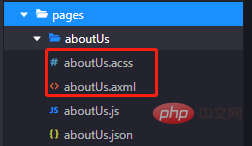
(1)文件命名不同
**支付宝小程序**
**微信小程序**
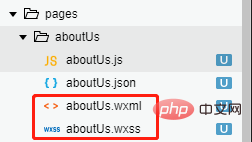
**我分别在微信小程序和支付宝小程序建立了页面,区别在于:**
1.支付宝小程序里面的视图层页面文件后缀是“axml”,样式文件后缀是“acss”;
2.微信小程序里面的视图层页面文件后缀是“wxml”,样式文件后缀是“wxss”。
(2)视图层页面axml以及wxml
1.冒泡事件和非冒泡事件
**支付宝小程序**
onTap, catchTap
on 事件绑定不会阻止冒泡事件向上冒泡,catch 事件绑定可以阻止冒泡事件向上冒泡。
**微信小程序**
`bindtap`、`catchtouchstart`
`bind`事件绑定不会阻止冒泡事件向上冒泡,`catch`事件绑定可以阻止冒泡事件向上冒泡。
2.列表渲染
Page({
data: {
list: \[{
Title: '支付宝',
}, {
Title: '微信',
}\]
}
})
**支付宝小程序**
{{item.Title}}
**微信小程序**
{{item.Title}}
3.条件渲染
**支付宝小程序**
1
2
3
**微信小程序**
1
2
3
**三、****开发过程中常用到的两个小程序中组件的不同用法**
(1)交互
1.消息提示框
**支付宝小程序**
my.showToast({
type: 'success',//默认 none,支持 success / fail / exception / none’。
content: '操作成功',//文字内容
duration: 3000,//显示时长,单位为 ms,默认 2000
success: () => {
my.alert({
title: 'toast 消失了',
});
},
});
my.hideToast()//隐藏弱提示。
**微信小程序**
wx.showToast({
title: '成功',//提示的内容
icon: 'success',//success 显示成功图标;loading 显示加载图标;none不显示图标
duration: 2000
})
//icon为“success”“loading”时 title 文本最多显示 7 个汉字长度
wx.hideToast() //隐藏
2.消息提示框
**支付宝小程序**
my.showLoading({
content: '加载中...',
delay: 1000,
});
my.hideLoading();
**微信小程序**
wx.showLoading({
title: '加载中',
})
wx.hideLoading()
3.http 请求
**支付宝小程序**
my.httpRequest({
url: 'http://httpbin.org/post',
method: 'POST',
data: {
from: '支付宝',
production: 'AlipayJSAPI',
},
headers:"",//默认 {'Content-Type': 'application/x-www-form-urlencoded'}
dataType: 'json',
success: function(res) {
my.alert({content: 'success'});
},
fail: function(res) {
my.alert({content: 'fail'});
},
complete: function(res) {
my.hideLoading();
my.alert({content: 'complete'});
}
});
**微信小程序**
wx.request({
url: 'test.php', //仅为示例,并非真实的接口地址
data: {
x: '',
y: ''
},
header: {
'content-type': 'application/json' // 默认值
},
success (res) {
console.log(res.data)
}
})
**其实微信小程序和支付宝小程序提供的api方法大致相同,只是微信小程序是以“wx.”起头,支付宝小程序是以“my.”起头,其余可能只是api方法里面字段“text、content、name、title”等命名不同。**
(2)选择器
1.时间选择器
**支付宝小程序**
支付宝小程序提供了一个api,my.datePicker(object)
my.datePicker({
format: 'yyyy-MM-dd',//返回的日期格式,
currentDate: '2012-12-12',//初始选择的日期时间,默认当前时间
startDate: '2012-12-10',//最小日期时间
endDate: '2012-12-15',//最大日期时间
success: (res) => {
my.alert({
content: res.date,
});
},
});
**微信小程序**
微信小程序是通过picker组件来实现的
日期选择器
当前选择: {{date}}
{
this.setData({
provinces: res.result\[0\].name,
city: res.result\[1\].name,
area: res.result\[2\].name,
})
}
});
},
})
**微信小程序**
微信小程序依然是通过picker组件来实现的
省市区选择器
当前选择:{{region\[0\]}},{{region\[1\]}},{{region\[2\]}}
//custom-item 可为每一列的顶部添加一个自定义的项,可为空
Page({
data: {
region: \['广东省', '广州市', '海珠区'\],
customItem: '全部'
},
bindRegionChange: function (e) {
console.log('picker发送选择改变,携带值为', e.detail.value)
this.setData({
region: e.detail.value
})
}
})
(3)小程序唤起支付
**支付宝小程序**
my.tradePay({
tradeNO: '201711152100110410533667792', // 调用统一收单交易创建接口(alipay.trade.create),获得返回字段支付宝交易号trade\_no
success: (res) => {
my.alert({
content: JSON.stringify(res),
});
},
fail: (res) => {
my.alert({
content: JSON.stringify(res),
});
}
});
**微信小程序**
wx.requestPayment({
timeStamp: '',//时间戳,从 1970 年 1 月 1 日 00:00:00 至今的秒数,即当前的时间
nonceStr: '',//随机字符串,长度为32个字符以下
package: '',//统一下单接口返回的 prepay\_id 参数值,提交格式如:prepay\_id=\*\*\*
signType: 'MD5',//签名算法
paySign: '',//签名
success (res) { },
fail (res) { }
})
(4)电话
**支付宝小程序**
my.makePhoneCall({
number: '400-8097-114'
})
**微信小程序**
wx.makePhoneCall({
phoneNumber: '400-8097-114'
})
(5)获取登录凭证(code)
**支付宝小程序**
my.getAuthCode({
success (res) {
if (res.authCode) {
console.log(res.authCode)
}
}
})
**微信小程序**
wx.login({
success (res) {
if (res.code) {
console.log(res.code)
}
}
})
支付宝小程序与微信小程序有很多相似之处,不论是组件还是api都会给你熟悉的感觉!
> **相关免费学习推荐:****微信小程序开发**
以上就是一起看看支付宝小程序与微信小程序开发的区别的详细内容,更多请关注知企PROSAAS其它相关文章!
**Tags:** catch, http, JS, json, Object, 事件, 微信小程序, 选择器
**Categories:** 后端开发
---