### [介绍小程序依赖分析实践](https://www.prosaas.cn/article/16513)
**Published:** 2020-11-03T09:27:39
**Author:** 5201314
**Excerpt:** 微信小程序开发教程介绍小程序依赖分析实践。用过 webpack 的同学肯定知道 ,可以用来分析当前项目 js …
## 微信小程序开发教程介绍小程序依赖分析实践。

用过 webpack 的同学肯定知道 `webpack-bundle-analyzer` ,可以用来分析当前项目 js 文件的依赖关系。
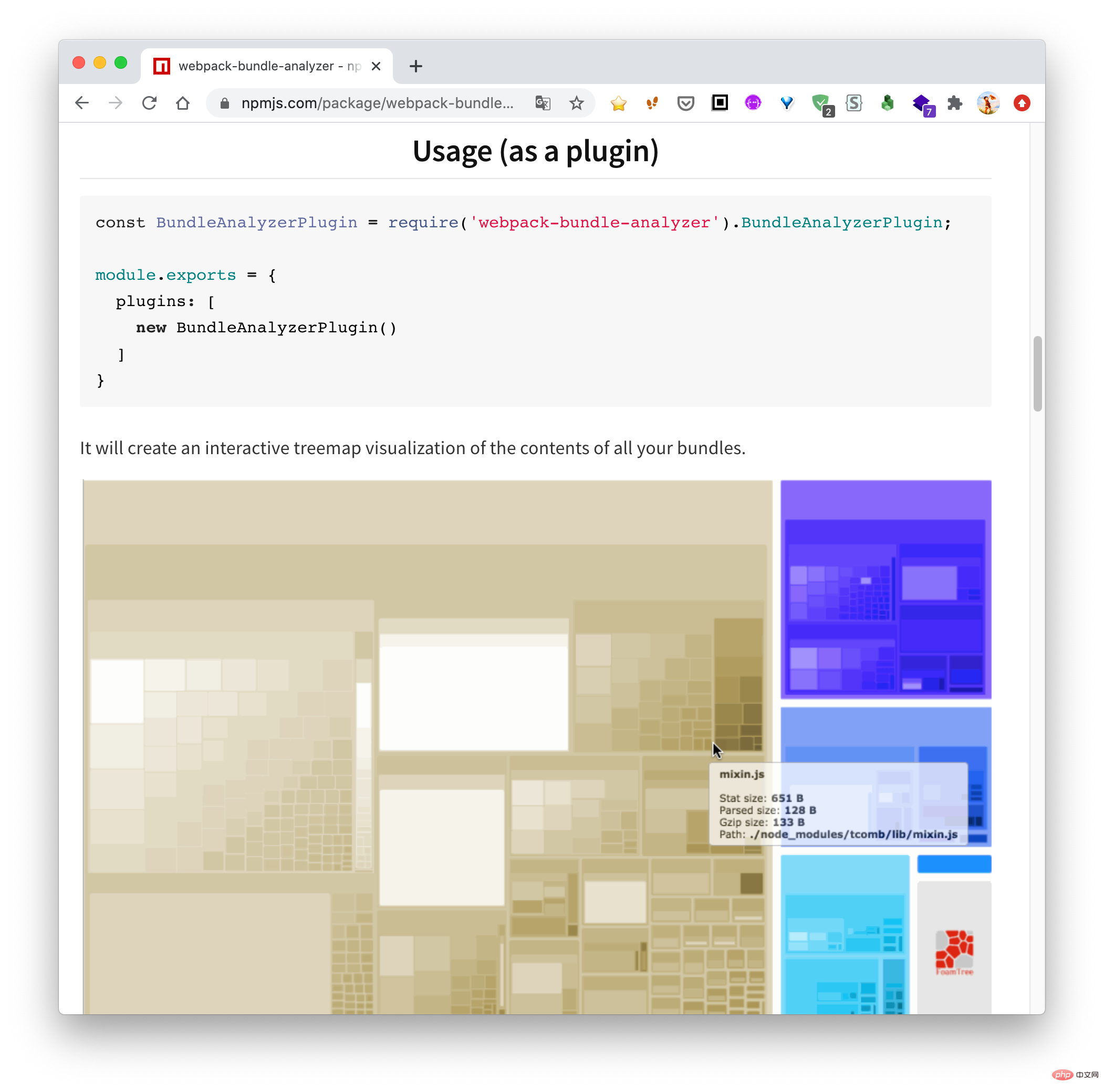
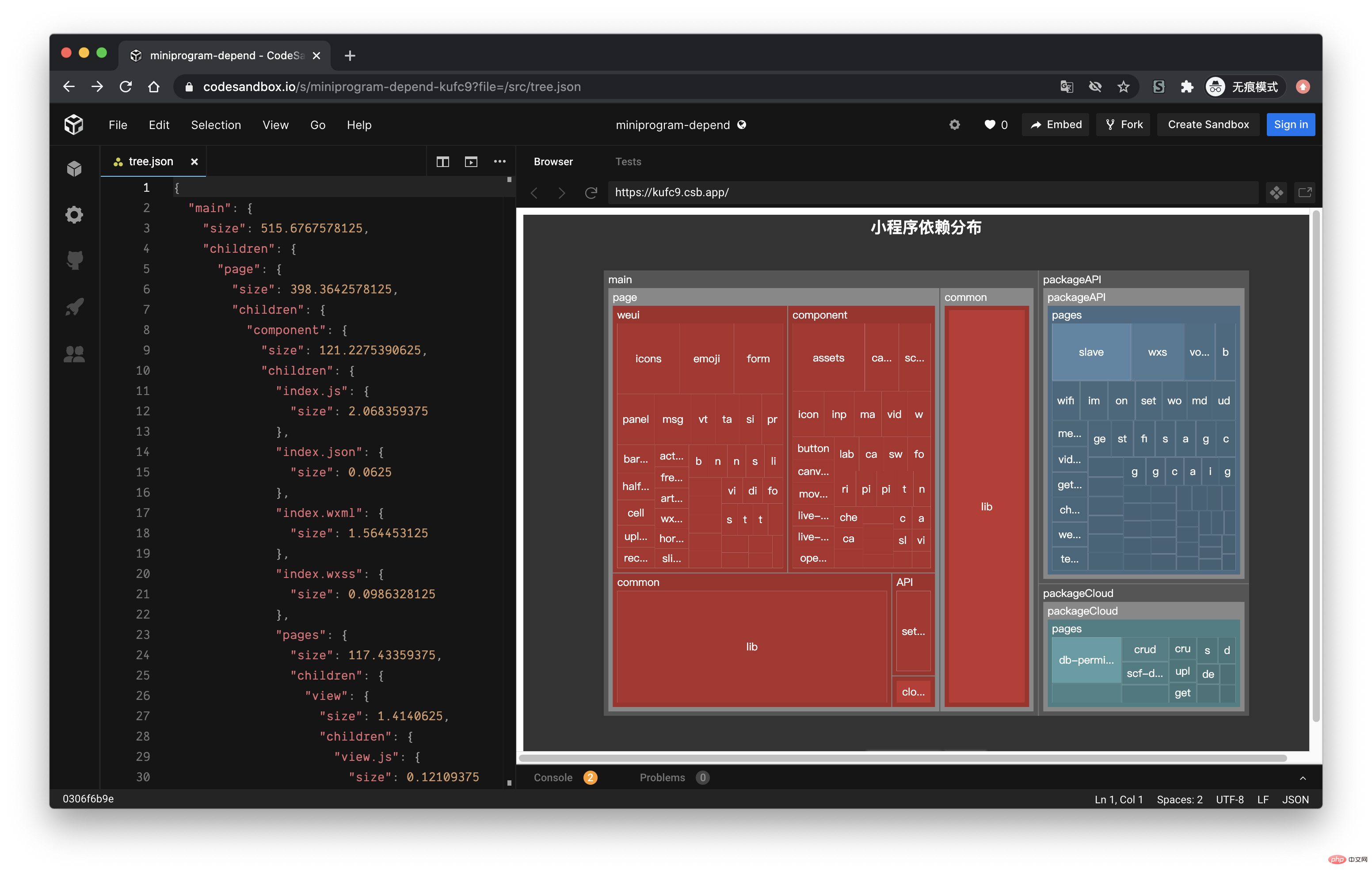
因为最近一直在做小程序业务,而且小程序对包体大小特别敏感,所以就想着能不能做一个类似的工具,用来查看当前小程序各个主包与分包之间的依赖关系。经过几天的折腾终于做出来了,效果如下:
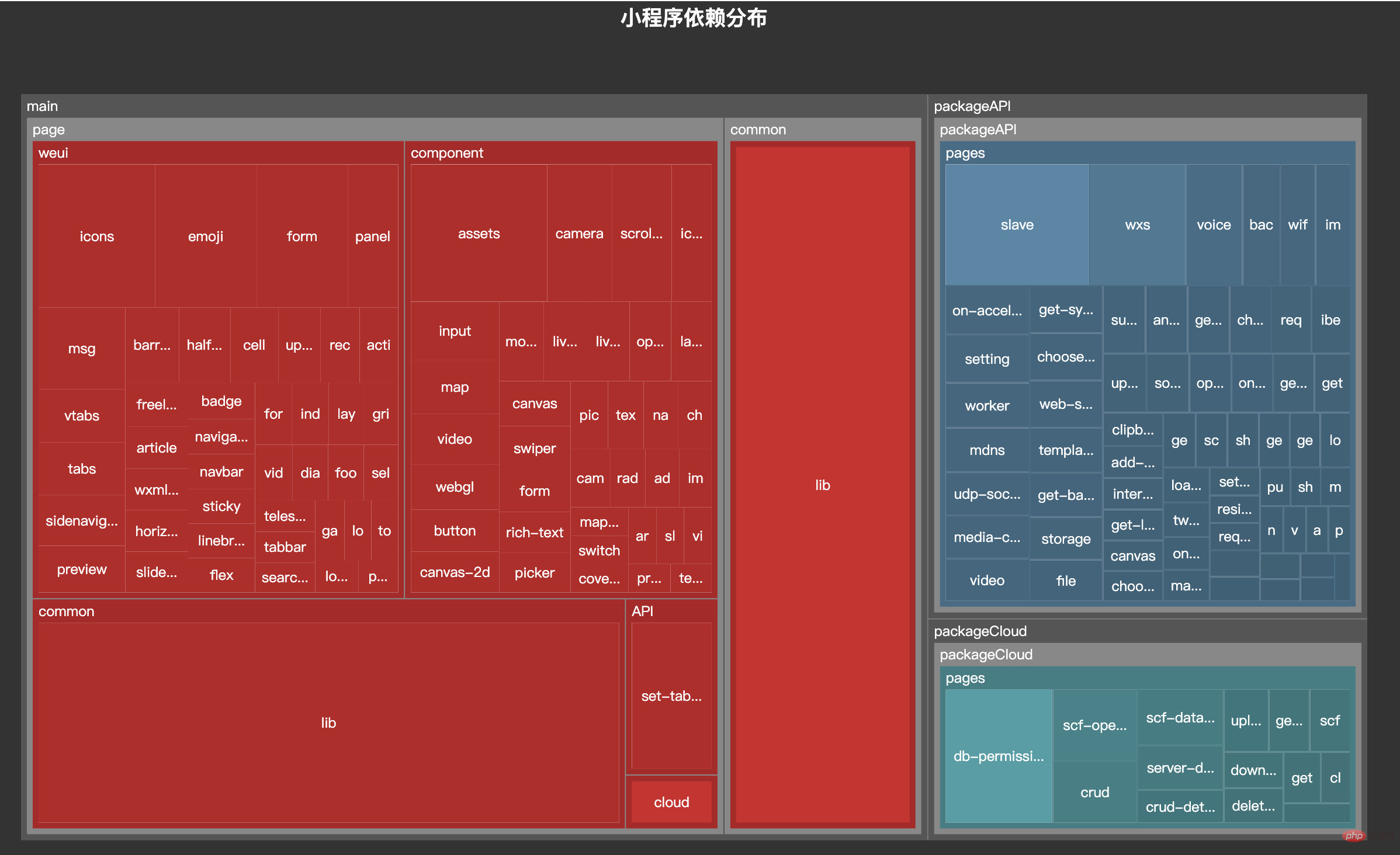
今天的文章就带大家来实现这个工具。
## 小程序入口
小程序的页面通过 `app.json` 的 `pages` 参数定义,用于指定小程序由哪些页面组成,每一项都对应一个页面的路径(含文件名) 信息。 `pages` 内的每个页面,小程序都会去寻找对应的 `json`, `js`, `wxml`, `wxss` 四个文件进行处理。
如开发目录为:
├── app.js
├── app.json
├── app.wxss
├── pages
│ │── index
│ │ ├── index.wxml
│ │ ├── index.js
│ │ ├── index.json
│ │ └── index.wxss
│ └── logs
│ ├── logs.wxml
│ └── logs.js
└── utils复制代码
则需要在 app.json 中写:
{ "pages": \["pages/index/index", "pages/logs/logs"\]
}复制代码
为了方便演示,我们先 fork 一份小程序的官方demo,然后新建一个文件 `depend.js`,依赖分析相关的工作就在这个文件里面实现。
$ git clone git@github.com:wechat-miniprogram/miniprogram-demo.git
$ cd miniprogram-demo
$ touch depend.js复制代码
其大致的目录结构如下:
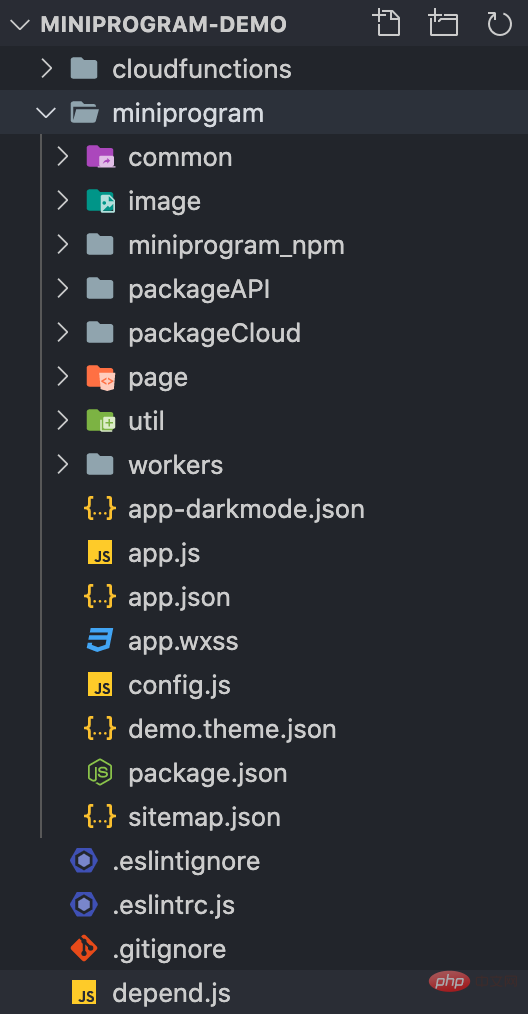
以 `app.json` 为入口,我们可以获取所有主包下的页面。
const fs = require('fs-extra')const path = require('path')const root = process.cwd()class Depend { constructor() { this.context = path.join(root, 'miniprogram')
} // 获取绝对地址
getAbsolute(file) { return path.join(this.context, file)
} run() { const appPath = this.getAbsolute('app.json') const appJson = fs.readJsonSync(appPath) const { pages } = appJson // 主包的所有页面
}
}复制代码
每个页面会对应 `json`, `js`, `wxml`, `wxss` 四个文件:
const Extends = \['.js', '.json', '.wxml', '.wxss'\]class Depend { constructor() { // 存储文件
this.files = new Set() this.context = path.join(root, 'miniprogram')
} // 修改文件后缀
replaceExt(filePath, ext = '') { const dirName = path.dirname(filePath) const extName = path.extname(filePath) const fileName = path.basename(filePath, extName) return path.join(dirName, fileName + ext)
} run() { // 省略获取 pages 过程
pages.forEach(page => { // 获取绝对地址
const absPath = this.getAbsolute(page)
Extends.forEach(ext => { // 每个页面都需要判断 js、json、wxml、wxss 是否存在
const filePath = this.replaceExt(absPath, ext) if (fs.existsSync(filePath)) { this.files.add(filePath)
}
})
})
}
}复制代码
现在 pages 内页面相关的文件都放到 files 字段存起来了。
## 构造树形结构
拿到文件后,我们需要依据各个文件构造一个树形结构的文件树,用于后续展示依赖关系。
假设我们有一个 `pages` 目录,`pages` 目录下有两个页面:`detail`、`index` ,这两个 页面文件夹下有四个对应的文件。
pages
├── detail
│ ├── detail.js
│ ├── detail.json
│ ├── detail.wxml
│ └── detail.wxss
└── index
├── index.js
├── index.json
├── index.wxml
└── index.wxss复制代码
依据上面的目录结构,我们构造一个如下的文件树结构,`size` 用于表示当前文件或文件夹的大小,`children` 存放文件夹下的文件,如果是文件则没有 `children` 属性。
pages = { "size": 8, "children": { "detail": { "size": 4, "children": { "detail.js": { "size": 1 }, "detail.json": { "size": 1 }, "detail.wxml": { "size": 1 }, "detail.wxss": { "size": 1 }
}
}, "index": { "size": 4, "children": { "index.js": { "size": 1 }, "index.json": { "size": 1 }, "index.wxml": { "size": 1 }, "index.wxss": { "size": 1 }
}
}
}
}复制代码
我们先在构造函数构造一个 `tree` 字段用来存储文件树的数据,然后我们将每个文件都传入 `addToTree` 方法,将文件添加到树中 。
class Depend { constructor() { this.tree = { size: 0, children: {}
} this.files = new Set() this.context = path.join(root, 'miniprogram')
}
run() { // 省略获取 pages 过程
pages.forEach(page => { const absPath = this.getAbsolute(page)
Extends.forEach(ext => { const filePath = this.replaceExt(absPath, ext) if (fs.existsSync(filePath)) { // 调用 addToTree
this.addToTree(filePath)
}
})
})
}
}复制代码
接下来实现 `addToTree` 方法:
class Depend { // 省略之前的部分代码
// 获取相对地址
getRelative(file) { return path.relative(this.context, file)
} // 获取文件大小,单位 KB
getSize(file) { const stats = fs.statSync(file) return stats.size / 1024
} // 将文件添加到树中
addToTree(filePath) { if (this.files.has(filePath)) { // 如果该文件已经添加过,则不再添加到文件树中
return
} const size = this.getSize(filePath) const relPath = this.getRelative(filePath) // 将文件路径转化成数组
// 'pages/index/index.js' =>
// \['pages', 'index', 'index.js'\]
const names = relPath.split(path.sep) const lastIdx = names.length - 1
this.tree.size += size let point = this.tree.children
names.forEach((name, idx) => { if (idx === lastIdx) {
point\[name\] = { size } return
} if (!point\[name\]) {
point\[name\] = {
size, children: {}
}
} else {
point\[name\].size += size
}
point = point\[name\].children
}) // 将文件添加的 files
this.files.add(filePath)
}
}复制代码
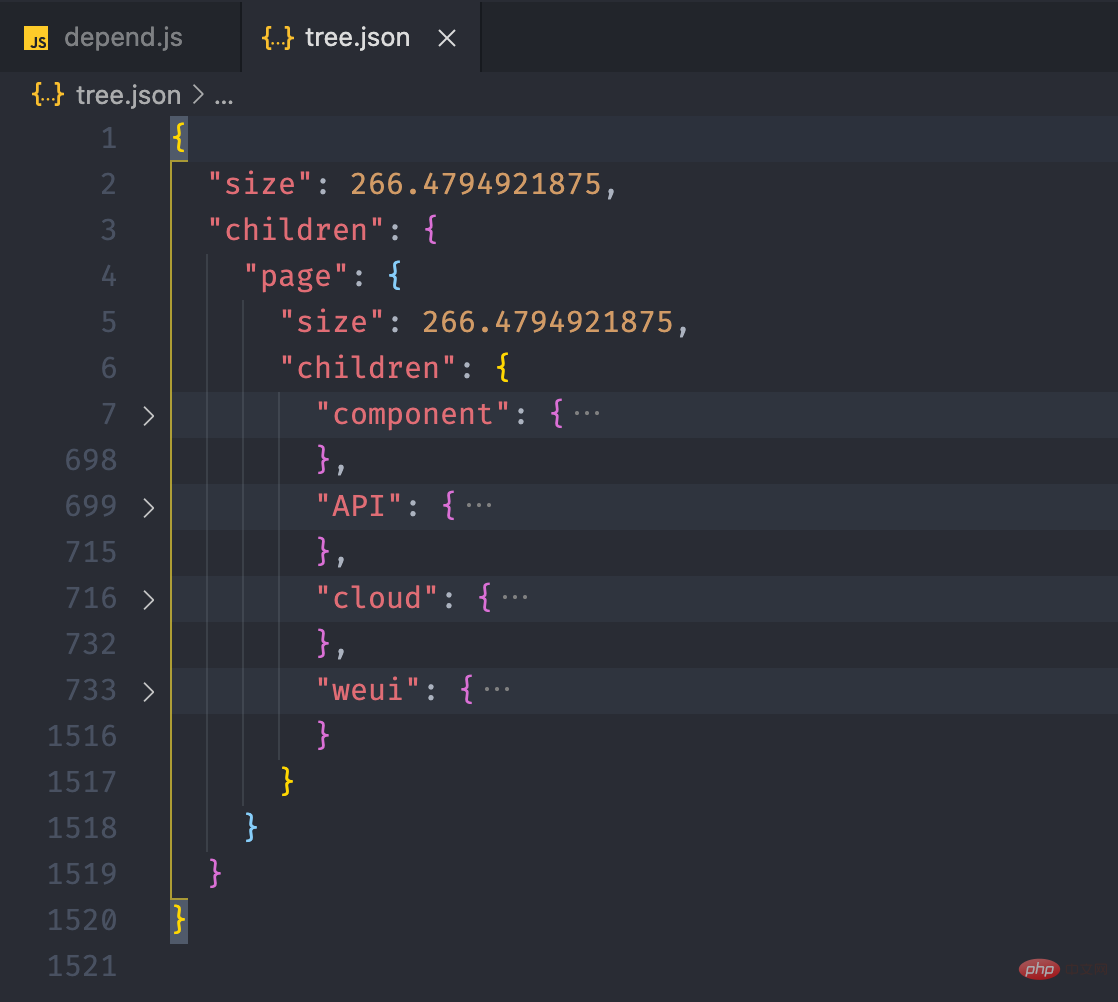
我们可以在运行之后,将文件输出到 `tree.json` 看看。
run() { // ...
pages.forEach(page => { //...
})
fs.writeJSONSync('tree.json', this.tree, { spaces: 2 })
}复制代码
## 获取依赖关系
上面的步骤看起来没什么问题,但是我们缺少了重要的一环,那就是我们在构造文件树之前,还需要得到每个文件的依赖项,这样输出的才是小程序完整的文件树。文件的依赖关系需要分成四部分来讲,分别是 `js`, `json`, `wxml`, `wxss` 这四种类型文件获取依赖的方式。
### 获取 .js 文件依赖
小程序支持 CommonJS 的方式进行模块化,如果开启了 es6,也能支持 ESM 进行模块化。我们如果要获得一个 `js` 文件的依赖,首先要明确,js 文件导入模块的三种写法,针对下面三种语法,我们可以引入 Babel 来获取依赖。
import a from './a.js'export b from './b.js'const c = require('./c.js')复制代码
通过 `@babel/parser` 将代码转化为 AST,然后通过 `@babel/traverse` 遍历 AST 节点,获取上面三种导入方式的值,放到数组。
const { parse } = require('@babel/parser')const { default: traverse } = require('@babel/traverse')class Depend { // ...
jsDeps(file) { const deps = \[\] const dirName = path.dirname(file) // 读取 js 文件内容
const content = fs.readFileSync(file, 'utf-8') // 将代码转化为 AST
const ast = parse(content, { sourceType: 'module', plugins: \['exportDefaultFrom'\]
}) // 遍历 AST
traverse(ast, { ImportDeclaration: ({ node }) => { // 获取 import from 地址
const { value } = node.source const jsFile = this.transformScript(dirName, value) if (jsFile) {
deps.push(jsFile)
}
}, ExportNamedDeclaration: ({ node }) => { // 获取 export from 地址
const { value } = node.source const jsFile = this.transformScript(dirName, value) if (jsFile) {
deps.push(jsFile)
}
}, CallExpression: ({ node }) => { if (
(node.callee.name && node.callee.name === 'require') &&
node.arguments.length >= 1
) { // 获取 require 地址
const \[{ value }\] = node.arguments const jsFile = this.transformScript(dirName, value) if (jsFile) {
deps.push(jsFile)
}
}
}
}) return deps
}
}复制代码
在获取依赖模块的路径后,还不能立即将路径添加到依赖数组内,因为根据模块语法 `js` 后缀是可以省略的,另外 require 的路径是一个文件夹的时候,默认会导入该文件夹下的 `index.js` 。
class Depend { // 获取某个路径的脚本文件
transformScript(url) { const ext = path.extname(url) // 如果存在后缀,表示当前已经是一个文件
if (ext === '.js' && fs.existsSync(url)) { return url
} // a/b/c => a/b/c.js
const jsFile = url + '.js'
if (fs.existsSync(jsFile)) { return jsFile
} // a/b/c => a/b/c/index.js
const jsIndexFile = path.join(url, 'index.js') if (fs.existsSync(jsIndexFile)) { return jsIndexFile
} return null
} jsDeps(file) {...}
}复制代码
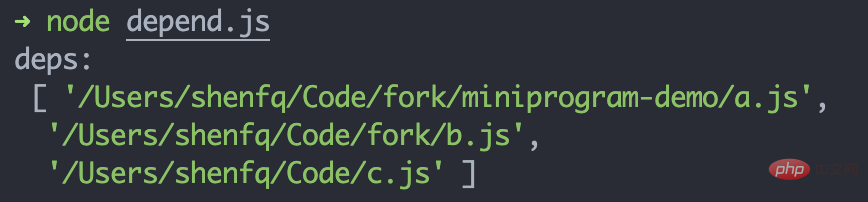
我们可以创建一个 `js`,看看输出的 `deps` 是否正确:
// 文件路径:/Users/shenfq/Code/fork/miniprogram-demo/import a from './a.js'export b from '../b.js'const c = require('../../c.js')复制代码
### 获取 .json 文件依赖
`json` 文件本身是不支持模块化的,但是小程序可以通过 `json` 文件导入自定义组件,只需要在页面的 `json` 文件通过 `usingComponents` 进行引用声明。`usingComponents` 为一个对象,键为自定义组件的标签名,值为自定义组件文件路径:
{ "usingComponents": { "component-tag-name": "path/to/the/custom/component"
}
}复制代码
自定义组件与小程序页面一样,也会对应四个文件,所以我们需要获取 `json` 中 `usingComponents` 内的所有依赖项,并判断每个组件对应的那四个文件是否存在,然后添加到依赖项内。
class Depend { // ...
jsonDeps(file) { const deps = \[\] const dirName = path.dirname(file) const { usingComponents } = fs.readJsonSync(file) if (usingComponents && typeof usingComponents === 'object') { Object.values(usingComponents).forEach((component) => {
component = path.resolve(dirName, component) // 每个组件都需要判断 js/json/wxml/wxss 文件是否存在
Extends.forEach((ext) => { const file = this.replaceExt(component, ext) if (fs.existsSync(file)) {
deps.push(file)
}
})
})
} return deps
}
}复制代码
### 获取 .wxml 文件依赖
wxml 提供两种文件引用方式 `import` 和 `include`。
复制代码
wxml 文件本质上还是一个 html 文件,所以可以通过 html parser 对 wxml 文件进行解析,关于 html parser 相关的原理可以看我之前写过的文章 《Vue 模板编译原理》。
const htmlparser2 = require('htmlparser2')class Depend { // ...
wxmlDeps(file) { const deps = \[\] const dirName = path.dirname(file) const content = fs.readFileSync(file, 'utf-8') const htmlParser = new htmlparser2.Parser({ onopentag(name, attribs = {}) { if (name !== 'import' && name !== 'require') { return
} const { src } = attribs if (src) { return
} const wxmlFile = path.resolve(dirName, src) if (fs.existsSync(wxmlFile)) {
deps.push(wxmlFile)
}
}
})
htmlParser.write(content)
htmlParser.end() return deps
}
}复制代码
### 获取 .wxss 文件依赖
最后 wxss 文件导入样式和 css 语法一致,使用 `@import` 语句可以导入外联样式表。
@import "common.wxss";复制代码
可以通过 `postcss` 解析 wxss 文件,然后获取导入文件的地址,但是这里我们偷个懒,直接通过简单的正则匹配来做。
class Depend { // ...
wxssDeps(file) { const deps = \[\] const dirName = path.dirname(file) const content = fs.readFileSync(file, 'utf-8') const importRegExp = /@import\\\\s\*\['"\](.+)\['"\];\*/g
let matched while ((matched = importRegExp.exec(content)) !== null) { if (!matched\[1\]) { continue
} const wxssFile = path.resolve(dirName, matched\[1\]) if (fs.existsSync(wxmlFile)) {
deps.push(wxssFile)
}
} return deps
}
}复制代码
### 将依赖添加到树结构中
现在我们需要修改 `addToTree` 方法。
class Depend { addToTree(filePath) { // 如果该文件已经添加过,则不再添加到文件树中
if (this.files.has(filePath)) { return
} const relPath = this.getRelative(filePath) const names = relPath.split(path.sep)
names.forEach((name, idx) => { // ... 添加到树中
}) this.files.add(filePath) // ===== 获取文件依赖,并添加到树中 =====
const deps = this.getDeps(filePath)
deps.forEach(dep => { this.addToTree(dep)
})
}
}复制代码
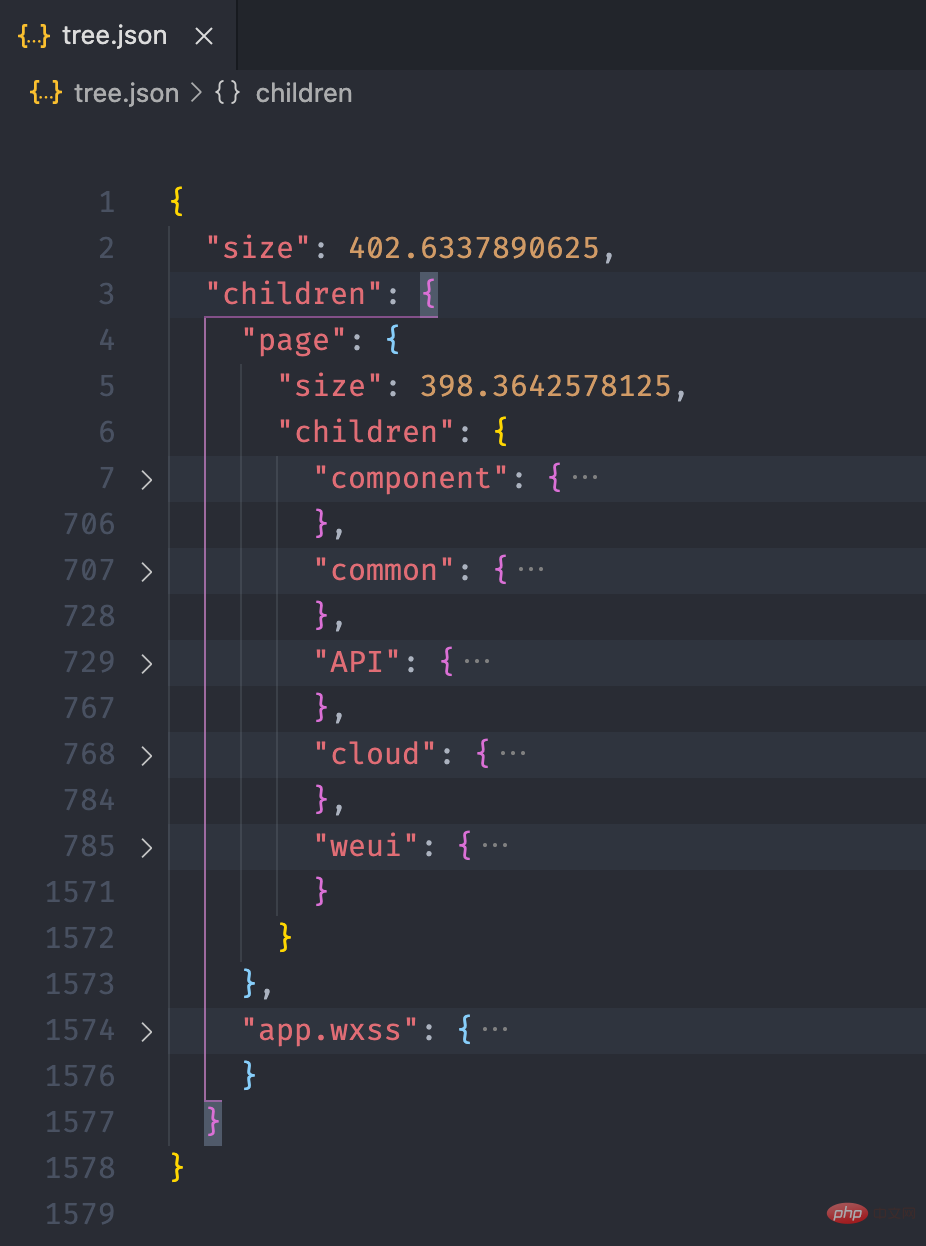
## 获取分包依赖
熟悉小程序的同学肯定知道,小程序提供了分包机制。使用分包后,分包内的文件会被打包成一个单独的包,在用到的时候才会加载,而其他的文件则会放在主包,小程序打开的时候就会加载。`subpackages` 中,每个分包的配置有以下几项:
| 字段 | 类型 | 说明 |
| :--- | :--- | :--- |
| root | String | 分包根目录 |
| name | String | 分包别名,分包预下载时可以使用 |
| pages | StringArray | 分包页面路径,相对与分包根目录 |
| independent | Boolean | 分包是否是独立分包 |
所以我们在运行的时候,除了要拿到 `pages` 下的所有页面,还需拿到 `subpackages` 中所有的页面。由于之前只关心主包的内容,`this.tree` 下面只有一颗文件树,现在我们需要在 `this.tree` 下挂载多颗文件树,我们需要先为主包创建一个单独的文件树,然后为每个分包创建一个文件树。
class Depend { constructor() { this.tree = {} this.files = new Set() this.context = path.join(root, 'miniprogram')
} createTree(pkg) { this.tree\[pkg\] = { size: 0, children: {}
}
} addPage(page, pkg) { const absPath = this.getAbsolute(page)
Extends.forEach(ext => { const filePath = this.replaceExt(absPath, ext) if (fs.existsSync(filePath)) { this.addToTree(filePath, pkg)
}
})
} run() { const appPath = this.getAbsolute('app.json') const appJson = fs.readJsonSync(appPath) const { pages, subPackages, subpackages } = appJson
this.createTree('main') // 为主包创建文件树
pages.forEach(page => { this.addPage(page, 'main')
}) // 由于 app.json 中 subPackages、subpackages 都能生效
// 所以我们两个属性都获取,哪个存在就用哪个
const subPkgs = subPackages || subpackages // 分包存在的时候才进行遍历
subPkgs && subPkgs.forEach(({ root, pages }) => {
root = root.split('/').join(path.sep) this.createTree(root) // 为分包创建文件树
pages.forEach(page => { this.addPage(\`${root}${path.sep}${page}\`, pkg)
})
}) // 输出文件树
fs.writeJSONSync('tree.json', this.tree, { spaces: 2 })
}
}复制代码
`addToTree` 方法也需要进行修改,根据传入的 `pkg` 来判断将当前文件添加到哪个树。
class Depend { addToTree(filePath, pkg = 'main') { if (this.files.has(filePath)) { // 如果该文件已经添加过,则不再添加到文件树中
return
} let relPath = this.getRelative(filePath) if (pkg !== 'main' && relPath.indexOf(pkg) !== 0) { // 如果该文件不是以分包名开头,证明该文件不在分包内,
// 需要将文件添加到主包的文件树内
pkg = 'main'
} const tree = this.tree\[pkg\] // 依据 pkg 取到对应的树
const size = this.getSize(filePath) const names = relPath.split(path.sep) const lastIdx = names.length - 1
tree.size += size let point = tree.children
names.forEach((name, idx) => { // ... 添加到树中
}) this.files.add(filePath) // ===== 获取文件依赖,并添加到树中 =====
const deps = this.getDeps(filePath)
deps.forEach(dep => { this.addToTree(dep)
})
}
}复制代码
这里有一点需要注意,如果 `package/a` 分包下的文件依赖的文件不在 `package/a` 文件夹下,则该文件需要放入主包的文件树内。
## 通过 EChart 画图
经过上面的流程后,最终我们可以得到如下的一个 json 文件:
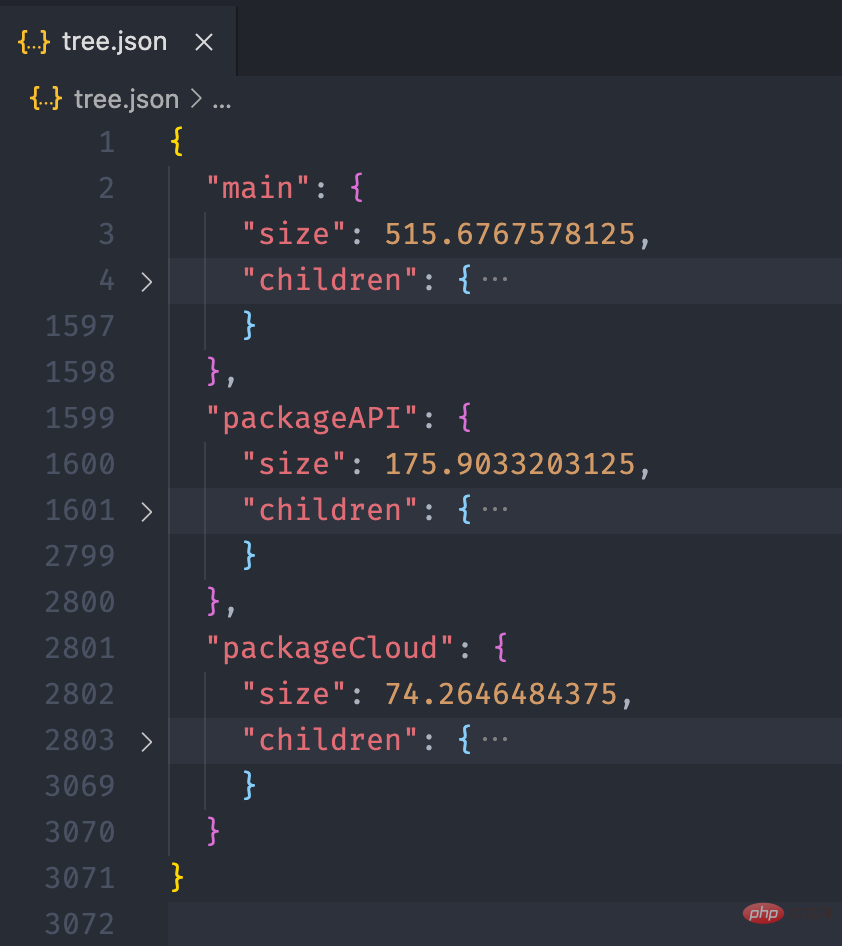
接下来,我们利用 ECharts 的画图能力,将这个 json 数据以图表的形式展现出来。我们可以在 ECharts 提供的实例中看到一个 Disk Usage 的案例,很符合我们的预期。
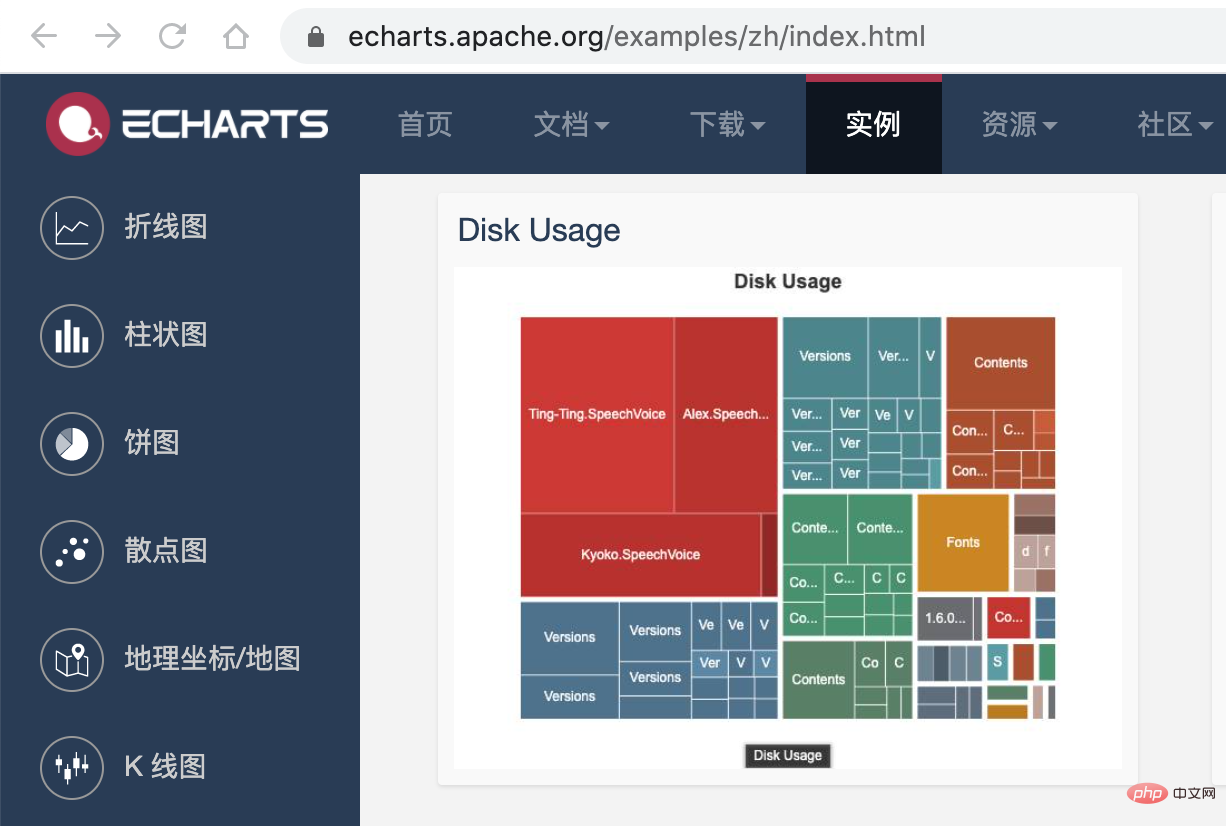
ECharts 的配置这里就不再赘述,按照官网的 demo 即可,我们需要把 `tree. json` 的数据转化为 ECharts 需要的格式就行了,完整的代码放到 codesandbod 了,去下面的线上地址就能看到效果了。
> 线上地址:https://codesandbox.io/s/cold-dawn-kufc9
## 总结
这篇文章比较偏实践,所以贴了很多的代码,另外本文对各个文件的依赖获取提供了一个思路,虽然这里只是用文件树构造了一个这样的依赖图。
在业务开发中,小程序 IDE 每次启动都需要进行全量的编译,开发版预览的时候会等待较长的时间,我们现在有文件依赖关系后,就可以只选取目前正在开发的页面进行打包,这样就能大大提高我们的开发效率。如果有对这部分内容感兴趣的,可以另外写一篇文章介绍下如何实现。
> **相关免费学习推荐:****微信小程序开发教程**
以上就是介绍小程序依赖分析实践的详细内容,更多请关注知企PROSAAS其它相关文章!
**Categories:** 后端开发
---