### [微信小程序省市联动功能](https://www.prosaas.cn/article/16595)
**Published:** 2020-06-24T01:59:34
**Author:** 5201314
**Excerpt:** 最近呢刚好做了一个省市联动的功能,今天看到有人问这个怎么做,我就把我做的放上来共享一下:首先呢,来看看效果,点…
最近呢刚好做了一个省市联动的功能,今天看到有人问这个怎么做,我就把我做的放上来共享一下:
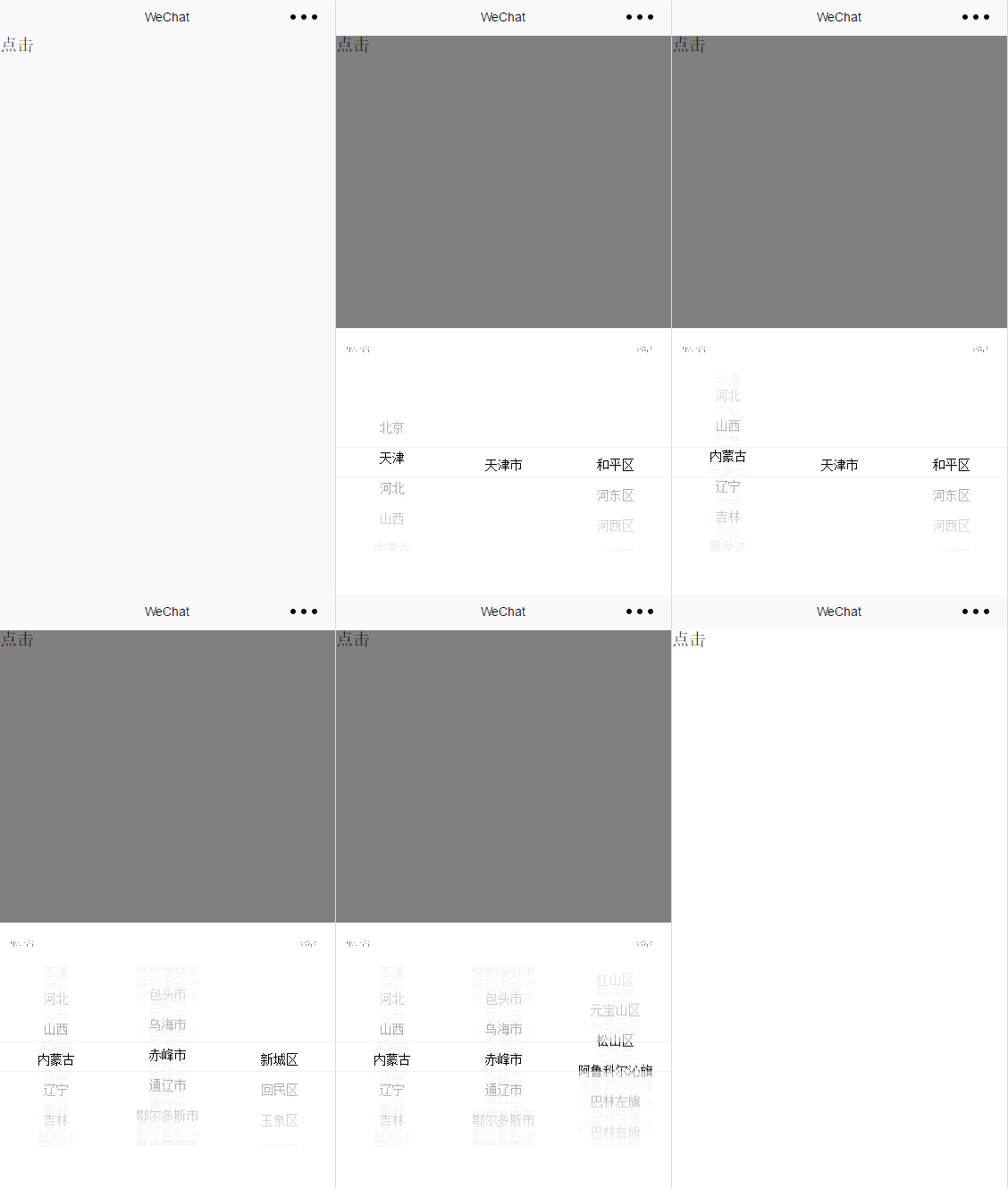
首先呢,来看看效果,点击文字‘点击’,弹出选择窗口,点击取消或者确定(取消、确定按钮在选择框上边,截图有些不清楚),窗口下滑,
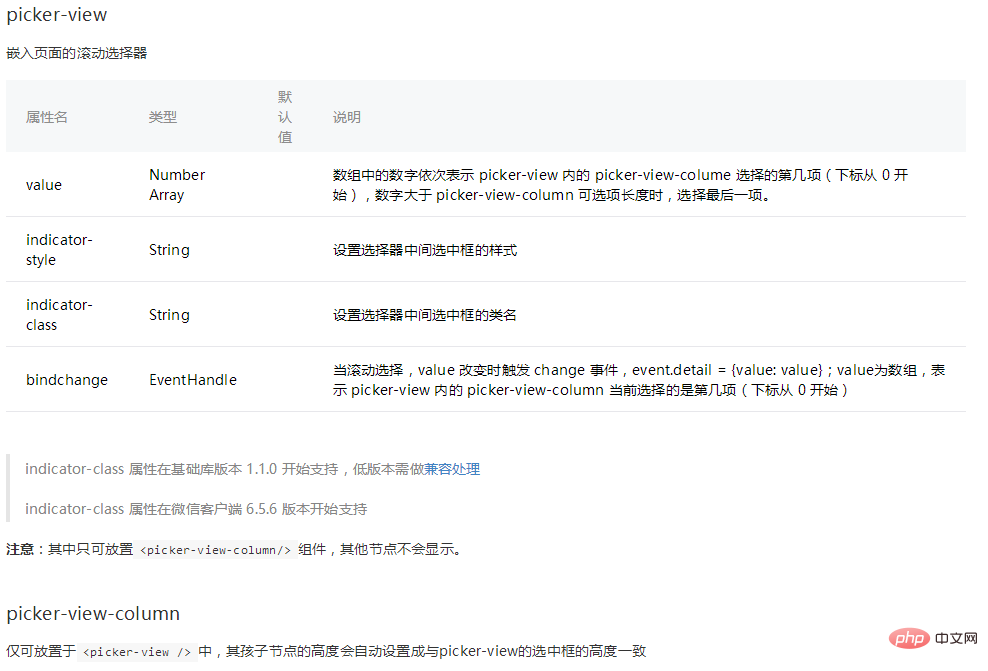
做这个我用的是picker-view这个组件,现在来看一看picker-view的属性:
现在开始写wxml的代码,对了,插一句,我这里是把它写成一个模板的,先看看目录结构
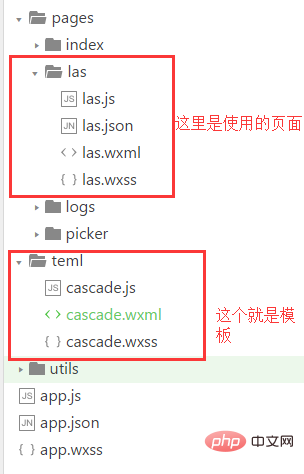
我们先来看看**cascade.wxml**里的代码:
{{item}}
{{item}}
{{item}}
接下来是**cascade.wxss**的代码:
.cascade\_box{
font-size:28rpx;
width: 100%;
height: 0;
position: fixed;
bottom: 0;
left: 0;
}
.cascade\_hei{
width: 100%;
height:732rpx;
background: #000;
opacity: 0.5;
}
.cascade\_find{
width: 100%;
height: 500rpx;
position: relative; /\*bottom: 0;
left: 0;\*/
background: #fff;
}
.quxiao,.queren{
display: block;
position: absolute;
width: 100rpx;
height: 80rpx;
line-height: 80rpx; /\*background: #00f;\*/
text-align: center;
color: #0f0;
}
.queren{
right: 0;
top: 0;
}
.cascade\_header{
height: 80rpx;
width: 100%;
margin-bottom: 20rpx;
}
好了这里的模板写好了,接下来是引用,引用就很简单了:
首先是**las.wxml**的引用:
点击
省:{{jieguo.sheng}}
市:{{jieguo.shi}}
区:{{jieguo.qu}}
然后是**las.wxss**的引用(你没看错就是一句):
@import '../../teml/cascade.wxss';
接下来就是JS了:
在这里要先说一下保存省市的名称的json文件格式,这个json文件里又全国的省市名称(这里只写了北京市为例子,这是我请求的数据的例子,你要根据你自己请求的数据来做一些JS的判断):
{
"regions": \[{
"id": 110000,
"name": "北京",
"regions": \[{
"id": 110100,
"name": "北京市",
"regions": \[{
"id": 110101,
"name": "东城区"
}, {
"id": 110102,
"name": "西城区"
}, {
"id": 110103,
"name": "崇文区"
}, {
"id": 110104,
"name": "宣武区"
}, {
"id": 110105,
"name": "朝阳区"
}, {
"id": 110106,
"name": "丰台区"
}, {
"id": 110107,
"name": "石景山区"
}, {
"id": 110108,
"name": "海淀区"
}, {
"id": 110109,
"name": "门头沟区"
}, {
"id": 110111,
"name": "房山区"
}, {
"id": 110112,
"name": "通州区"
}, {
"id": 110113,
"name": "顺义区"
}, {
"id": 110114,
"name": "昌平区"
}, {
"id": 110115,
"name": "大兴区"
}, {
"id": 110116,
"name": "怀柔区"
}, {
"id": 110117,
"name": "平谷区"
}, {
"id": 110228,
"name": "密云县"
}, {
"id": 110229,
"name": "延庆县"
}\]
}\],
"pinyin": "BeiJing",
"hot": true,
"municipality": true
}\]}
这里就是对数据进行操作的**las.js**了
Page({
data: {
sheng: \[\],//获取到的所有的省
shi: \[\],//选择的该省的所有市
qu: \[\],//选择的该市的所有区县
sheng\_index:0,//picker-view省项选择的value值
shi\_index:0,//picker-view市项选择的value值
qu\_index:0,//picker-view区县项选择的value值
shengshi:null,//取到该数据的所有省市区数据
jieguo:{},//最后取到的省市区名字
animationData: {}
},
//点击事件,点击弹出选择页
dianji:function(){
//这里写了一个动画,让其高度变为满屏
var animation = wx.createAnimation({
duration: 500,
timingFunction: 'ease',
})
this.animation = animation
animation.height(1332+'rpx').step()
this.setData({
animationData:animation.export()
})
},
//取消按钮
quxiao:function(){
//这里也是动画,然其高度变为0
var animation = wx.createAnimation({
duration: 500,
timingFunction: 'ease',
})
this.animation = animation
animation.height(0+'rpx').step()
this.setData({
animationData:animation.export()
});
//取消不传值,这里就把jieguo 的值赋值为{}
this.setData({
jieguo:{}
});
console.log(this.data.jieguo);
},
//确认按钮
queren:function(){
//一样是动画,级联选择页消失,效果和取消一样
var animation = wx.createAnimation({
duration: 500,
timingFunction: 'ease',
})
this.animation = animation
animation.height(0+'rpx').step()
this.setData({
animationData:animation.export()
});//打印最后选取的结果
console.log(this.data.jieguo);
},
//滚动选择的时候触发事件
bindChange: function(e) {
//这里是获取picker-view内的picker-view-column 当前选择的是第几项
const val = e.detail.value
this.setData({
sheng\_index: val\[0\],
shi\_index: val\[1\],
qu\_index: val\[2\]
})
this.jilian();
console.log(val);
console.log(this.data.jieguo);
},
//这里是判断省市名称的显示
jilian:function(){
var that=this,
shengshi=that.data.shengshi,
sheng=\[\],
shi=\[\],
qu=\[\],
qu\_index=that.data.qu\_index,
shi\_index=that.data.shi\_index,
sheng\_index=that.data.sheng\_index;
//遍历所有的省,将省的名字存到sheng这个数组中
for (let i =0; i
推荐教程:《微信小程序》
以上就是微信小程序省市联动功能的详细内容,更多请关注知企PROSAAS其它相关文章!
**Categories:** 后端开发
---