### [小程序的下拉刷新问题](https://www.prosaas.cn/article/16601)
**Published:** 2020-06-22T03:18:16
**Author:** 5201314
**Excerpt:** 在小程序中onLoad生命钩子只在页面创建时调用一次,在做navigateTo页面跳转后,返回上级页面,由于n…
在小程序中onLoad生命钩子只在页面创建时调用一次,在做navigateTo页面跳转后,返回上级页面,由于navigateTo跳转只是隐藏了当前页面,因此返回上一级页面时onLoad生命钩子不会再次执行,这样带来的好处是页面能快速展示出来,但是onLoad中的请求数据不会实时更新,这时候就需要一个下拉刷新的操作来帮助用手动更新页面数据,接下来这篇文章将会介绍小程序中实现下拉刷新的三种方式
## enablePullDownRefresh
enablePullDownRefresh是最容易实现下拉刷新的方法,在json文件中将enablePullDownRefresh设置为true,在Page中监听onPullDownRefresh事件即可,支持点击顶部标题栏回到顶部,自定义标题栏时会失效,还可以通过直接调用wx.startPullDownRefresh()触发下拉刷新事件,产生下拉刷新动画,处理完下拉刷新中的数据更新后调用wx.stopPullDownRefresh()结束动画即可。
这种形式的下拉刷新的优点很明显就是简单,没有限制,但是缺点也同样明显:
- 下拉动画太过简单,交互不够优雅且不能自定义下拉动画
- 当自定义标题栏时,fixed定位,在Android下标题栏也会被一起下拉
## scroll-view
scroll-view是官方的一个滚动视图组件,使用很简单,想要设置上拉刷新代码如下:
content
想要利用scroll-view实现上拉刷新,需要注意:
- 一定要给scroll-view设置固定高度,否则监听事件不会触发
- 设置纵向滚动scroll-y
- scroll-view内的内容高度一定要比scroll-view高度要高,否则无法产生纵向滚动,就无法触发监听事件
scroll-view缺点:
- 由于iOS有橡皮筋效果,因此最终效果会与Android有一定的差异
- 刚打开页面时上拉是无法触发上拉监听事件,需要先向下滚动,触发滚动,然后再上拉滚动才能触发监听事件
- 当有自定义头部时,scroll-view需要一个高度计算,减去头部高度
scroll-view优点:
- 可以自定义加载动画
- 代码相对简单
- 相对enablePullDownRefresh,scroll-view对滚动列表控制更加方便:
- scroll-into-view:滚动到指定元素
- enable-back-to-top:iOS点击顶部状态栏、安卓双击标题栏时,滚动条返回顶部,只支持竖向,且当自定义标题栏后就会失效
官方并不推荐使用scroll-view做下拉刷新,官方文档上有这样一个tip

## 自定义下拉刷新
自定义下拉刷新最主要希望解决的问题还是在Android使用enablePullDownRefresh时fixed定位的标题栏或导航栏会被下拉的问题,同时两端在下拉刷新时的动画保持一致,其实实现起来并不难,接下来就看看具体实现:
wxml:
{{state === 0 ? '下拉刷新' : state === 1? '松开刷新' : '刷新中'}}
这个文件定义组件的模版,有一个滚动view包裹,绑定了touch事件,里面包含下拉刷新时的动画,和一个slot,slot用于插入滚动列表的内容
wxss:
.animation {
display: flex;
justify-content: center;
align-items: center;
width: 100%;
height: 150rpx;
margin-bottom: -150rpx;
background-color: #fff;
}
.loading {
width: 30rpx;
height: 30rpx;
border:6rpx solid #333333;
border-bottom: #cccccc 6rpx solid;
border-radius: 50%;
animation:load 1.1s infinite linear;
}
@keyframes load{
from{
transform: rotate(0deg);
}
to{
transform: rotate(360deg);
}
}
.tip {
margin-left: 10rpx;
color: #666;
}
样式文件这没什么特别的
js:
let lastY = 0 // 上一次滚动的位置
let scale = 750 / wx.getSystemInfoSync().windowWidth // rpx转化比例
Component({
options: {
multipleSlots: true
},
data: {
scrollTop: 0,
translateHeight: 0, // 平移距离
state: -1
},
properties: {
// 触发下拉刷新的距离
upperDistance: {
type: Number,
value: 150
}
},
methods: {
// 监听滚动,获取scrollTop
onPageScroll (e) {
this.data.scrollTop = e.scrollTop
},
touchStart (e) {
lastY = e.touches\[0\].clientY
},
touchMove (e) {
let clientY = e.touches\[0\].clientY
let offset = clientY - lastY
if (this.data.scrollTop > 0 || offset < 0) return
this.data.translateHeight += offset
this.data.state = 0
lastY = e.touches\[0\].clientY
if (this.data.translateHeight - this.data.scrollTop \* scale > this.data.upperDistance) {
this.data.state = 1
}
this.setData({
translateHeight: this.data.translateHeight,
state: this.data.state
})
},
touchEnd (e) {
if (this.data.translateHeight - this.data.scrollTop \* scale > this.data.upperDistance) {
this.setData({
translateHeight: 150
})
this.triggerEvent('scrolltoupper')
this.setData({
state: 2
})
} else if (this.data.scrollTop <= 0) {
this.stopRefresh()
}
},
// 停止刷新
stopRefresh () {
this.setData({
translateHeight: 0,
state: -1
}, () => {
wx.pageScrollTo({
scrollTop: 0,
duration: 0
})
})
}
}
})
这个下拉刷新组件最重要的是控制下拉刷新的时机,代码体现就是定义了一个upperDistance,下拉刷新的距离来判断是否执行刷新。手指滑动时,获取滑动距离,translateHeight累加用于展示,在touchEnd事件中判断滑动距离是否达到设定值,达到设定值就发送scrolltoupper事件,在父组件中监听即可,否则停止刷新。
#### 使用:
{{item}}
Page({
data: {
list: \[\]
},
onLoad: function () {
this.refreshScroll = this.selectComponent('#refreshScroll')
for (let i = 0; i < 10; i++) {
this.data.list.push(i)
}
this.setData({
list: this.data.list
})
},
onPageScroll (e) {
this.refreshScroll.onPageScroll(e)
},
onReachBottom () {
wx.showLoading({
title: 'onReachBottom'
})
setTimeout(() => {
wx.hideLoading()
}, 1000)
},
refresh: function (e) {
setTimeout(() => {
this.refreshScroll.stopRefresh()
}, 1000)
}
})
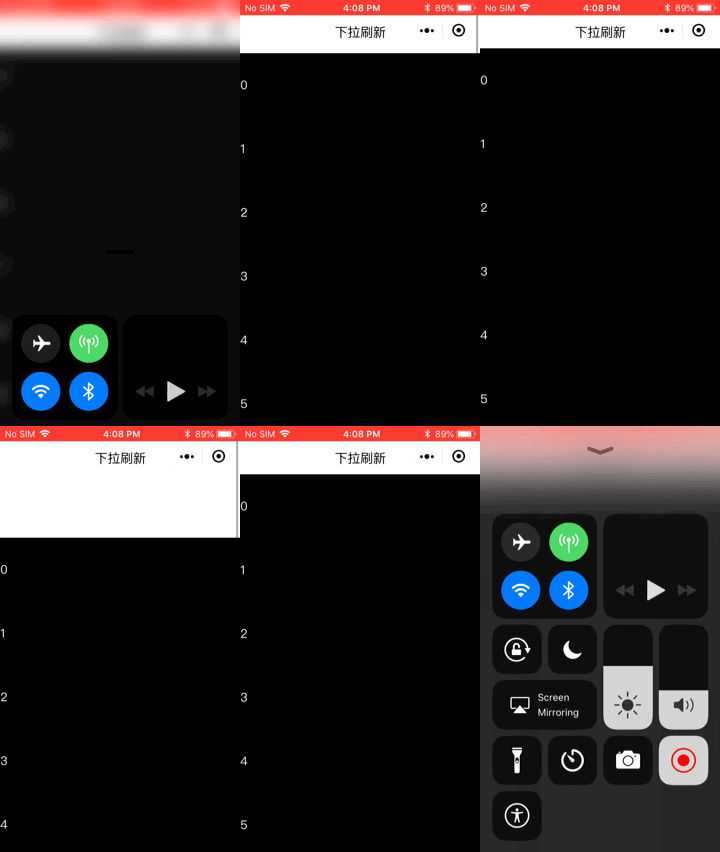
在使用时关键是要将页面中onPageScroll中获取的值传递下去,然后bindscrolltoupper监听scrolltoupper事件,执行刷新操作然后再调用stopRefresh停止刷新,下来看真机上的测试效果:
iOS:
Android:

在真机测试时,表现都还不错,当然了,这只是自定义下拉刷新的一个简单组件例子,如果需要用于到实际项目,可能还需要自己去完善,毕竟不同的人应用的场景不同,这里只是给出了一个思路而已
## 总结
本篇文章介绍了小程序下拉刷新时的三种方法,前两种都是小程序官方提供的,最后一种是个人的思考总结,写的也比较简单,想要项目应用,还需要自己完善,只希望为大家做自定义下拉刷新提供一个思路。
推荐教程:《微信小程序》
以上就是小程序的下拉刷新问题的详细内容,更多请关注知企PROSAAS其它相关文章!
**Tags:** android, ios, JS, json, 事件, 值传递, 微信小程序
**Categories:** 后端开发
---