### [如何从零开发微信小程序搜索组件](https://www.prosaas.cn/article/16880)
**Published:** 2020-03-20T02:29:42
**Author:** 5201314
**Excerpt:** 本篇文章介绍了从零开发一个微信小程序搜索组件的方法,希望对学习微信小程序开发的朋友有帮助!如何从零开发微信小程…
本篇文章介绍了从零开发一个微信小程序搜索组件的方法,希望对学习微信小程序开发的朋友有帮助!

**如何从零开发微信小程序搜索组件**
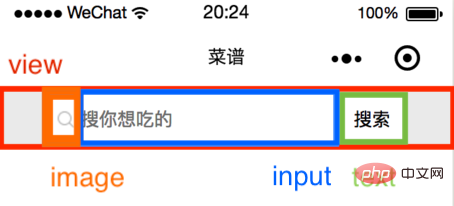
为组件设置一个容器,在容器中放置搜索图标、输入框、清除文字按钮和搜索按钮。
搜索
组件样式(推荐学习:小程序开发)
> container:高度 100 rpx,背景色 #eee,flex 布局。
>
> input-wrapper:高度 80 rpx,背景色 #fff,flex 布局,border-radius: 20rpx。
>
> search-icon:宽高 32 rpx。
>
> input:字体和光标颜色 #000,字体大小 32 rpx。
>
> close-icon-wrapper:宽高 80 rpx,绝对定位。
>
> text:搜索按钮宽 110 rpx,高 65 rpx,绝对定位,左边框 2rpx solid #eee。
.container {
background: #eee;
height: 100rpx;
width: 100%;
display: flex;
justify-content: center;
align-items: center;
}
.input-wrapper {
display: flex;
align-items: center;
height: 80rpx;
width: 80%;
background: #fff;
border-radius: 20rpx;
}
.input-wrapper .search-icon {
margin-left: 20rpx;
width: 32rpx;
height: 32rpx;
}
.input-wrapper input {
margin-left: 10rpx;
color: #000;
font-size: 32rpx;
caret-color: #000;
width: 60%;
}
.input-wrapper .close-icon-wrapper{
position: absolute;
left: 480rpx;
width: 80rpx;
height: 80rpx;
background:#fff;
display: flex;
justify-content: center;
align-items: center;
}
.input-wrapper .close-icon {
width: 42rpx;
height: 42rpx;
}
.input-wrapper text {
position: absolute;
right: 80rpx;
width: 110rpx;
height: 65rpx;
padding: 0;
background: #fff;
display: flex;
justify-content: center;
align-items: center;
font-size: 32rpx;
border-left: 2rpx solid #eee;
}
**组件功能**
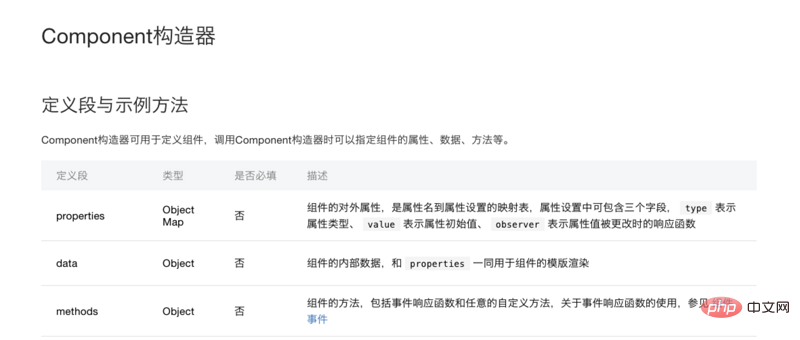
组件的构造器中要注意区分 properties 和 data,properties 中写组件的对外属性,data 写组件的对内属性。在本搜索组件中 placeholder 和 value 从页面传来,所以它们写在 properties 中,控制清除按钮是否出现的 showCloseIcon 要写在 data 中。
properties: {
placeholder: {
type: String,
value: '搜索' // 如果页面不传placeholder,显示“搜索”
},
inputValue: {
type: String
}
},
data: {
showCloseIcon: false,
},
**2、方法设置**
事件流程
(1)光标不聚焦,没有任何输入——显示搜索图标、placeholder和搜索按钮。
(2)光标聚焦,没有任何输入——光标闪烁,显示搜索图标、placeholder和搜索按钮。
(3)光标聚焦,有输入——光标闪烁,显示搜索图标、输入文字、清除按钮和搜索按钮。
(4)光标不聚焦,有输入——显示搜索图标、输入文字、清除按钮和搜索按钮。
(5)按回车搜索——清除按钮隐藏。
(6)点击搜索按钮——清除按钮隐藏。
由此可见,需要 input 组件的聚焦和键盘输入事件。
> inputFocused:如果聚焦时,输入框中有内容,显示 closeIcon;
>
> handleInput:如果输入时没有内容,不显示 closeIcon,有内容,显示 closeIcon 并把值存入 value。
>
> handleSearch:点击回车后,不显示 closeIcon。
>
> triggerEvent:自定义组件触发事件时,需要使用 triggerEvent 方法,指定事件名、detail对象和事件选项。
inputFocused(e) {
if (e.detail.value !== '') {
this.setData({
showCloseIcon: true,
});
}
},
handleInput(e) {
if (e.detail.value == '') {
this.setData({
showCloseIcon: false,
});
} else {
this.setData({
showCloseIcon: true,
});
this.triggerEvent('handleInput', {
value: e.detail.value
});
}
},
handleSearch() { // 点击键盘上的回车,调用此方法
this.setData({
showCloseIcon: false,
});
console.log('handleSearch', this.data.inputValue);
},
搜索分别为 closeIcon 和 搜索按钮添加点击事件。
分别为 closeIcon 和 搜索按钮添加点击事件。
clearValue() {
this.triggerEvent('handleInput', {
value: ''
});
this.setData({
showCloseIcon: false,
});
},
onTap() {
this.setData({
showCloseIcon: false,
});
console.log('onTap', this.data.inputValue);
},组件 json
{
component:true
}
页面 json
工程的名字是 cookbook,这里组件前缀统一为 ck。
{
usingComponents:{
ck-input:/components/search/index
}
}
页面 wxml
页面 js
handleInput(e) {
this.setData({
inputValue: e.detail.value,
});
},
至此,搜索组件已完成初步开发。
PHP中文网,大量jquery视频教程,欢迎学习!
以上就是如何从零开发微信小程序搜索组件的详细内容,更多请关注知企PROSAAS其它相关文章!
**Categories:** 后端开发
---