### [小程序怎么做音乐播放条](https://www.prosaas.cn/article/16889)
**Published:** 2020-03-19T10:06:04
**Author:** 5201314
**Excerpt:** 小程序怎么做音乐播放条 可以使用progress组件实现音乐播放条,具体做法如下:1、添加一个audio标签,…

**小程序怎么做音乐播放条**
可以使用progress组件实现音乐播放条,具体做法如下:
1、添加一个audio标签,不指定controls="true"属性即可隐藏。
点击播放
{{musicPercent}}%
> bindtouchmove表示触摸事件;
>
> progress标签通过percent属性设置进度
2、编写WSS文件
推荐学习:小程序开发
.play-it{
margin-left: 300rpx;
}
.music-prog{
width: 550rpx;
height: 10rpx;
margin: 50rpx 100rpx;
color: #0099ff;
background-color: #999;
}
.percent-num{
margin: -20rpx 0 0 100rpx;
font-size: 28rpx;
}
3、编写js,控制播放条。
onShow() {
// 监听音乐播放
let that = this
wx.onBackgroundAudioPlay(() => {
that.timer && clearInterval(that.timer)
that.timer = setInterval(() => {
wx.getBackgroundAudioPlayerState({
success: res => {
let per = (res.currentPosition/res.duration)\*10000
that.setData({
musicPercent: Math.round(per)/100 + '',
duration: res.duration
})
}
})
}, 1000)
})
// 监听背景音频暂停事件
wx.onBackgroundAudioPause(() => {
clearInterval(that.timer)
})
// 监听背景音频停止事件
wx.onBackgroundAudioStop(() => {
clearInterval(that.timer)
})
},
playMusic() {
let obj = {
dataUrl: 'http://p6jceeddp.bkt.clouddn.com/%E5%B0%A4%E9%95%BF%E9%9D%96%20-%20%E6%98%A8%E6%97%A5%E9%9D%92%E7%A9%BA.mp3',
title: '昨日青空',
coverImgUrl: '/static/images/avatar.png'
}
wx.playBackgroundAudio(obj)
},
setTouchMove (e) {
if(e.touches\[0\].clientY >= 390 && e.touches\[0\].clientY <= 410) {
if (e.touches\[0\].clientX >= 55 && e.touches\[0\].clientX <= 355) {
let percent = (e.touches\[0\].clientX - 55)/300\*10000
this.setData({
musicPercent: Math.round(percent)/100 + ''
})
this.data.current = (this.data.musicPercent/100)\*this.data.duration
}
}
},
setProgress() {
let that = this
console.log('bindtouchend')
wx.getBackgroundAudioPlayerState({
success: res => {
that.data.current !== res.currentPosition &&
wx.seekBackgroundAudio({
position: that.data.current,
success () {
console.log('seek', that.data.current)
}
})
}
})
}
播放条的有效区域
> 横向: e.touches\[0\].clientX
>
> 纵向: e.touches\[0\].clientY
>
> 此处横向为 55~355 ,纵向为 390~410
**定义触摸事件**
获取到的横向进度条位置,计算用户所拖拽到的进度条位置
\*\*注意:在此处调用wx.seekBackgroundAudio()设置播放进度,会导致音频出现卡顿的效果。因为用户拖动的过程中会多次调用seek方法,所以应该把设置播放进度放在拖动进度条完成之后再执行。
**touchend监听触摸事件的停止**
根据触摸事件中计算得到的时间current,调用wx.seekBackgroundAudio()设置播放进度
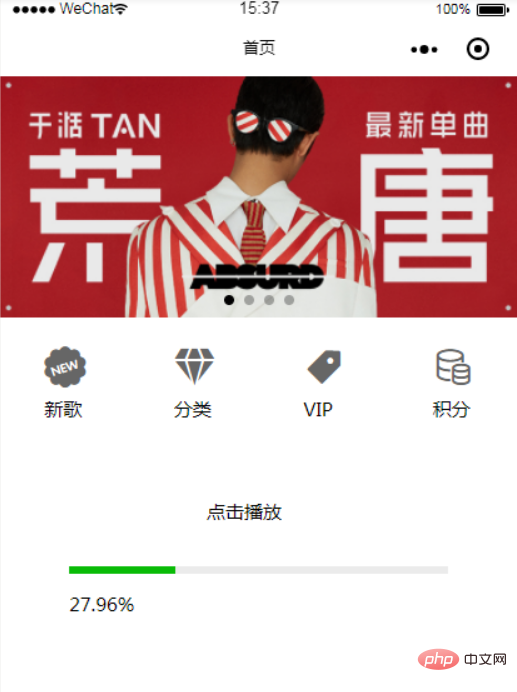
效果:
PHP中文网,大量网站建设教程,欢迎学习!
以上就是小程序怎么做音乐播放条的详细内容,更多请关注知企PROSAAS其它相关文章!
**Tags:** JS, php, 事件
**Categories:** 后端开发
---