### [小程序怎么把富文本转换为文本](https://www.prosaas.cn/article/16916)
**Published:** 2020-03-18T01:43:34
**Author:** 5201314
**Excerpt:** 小程序怎么把富文本转换为文本?微信小程序-富文本转文本最近小程序这么火,我也来搞搞。发现了一个恶心的问题。小程…
****
**小程序怎么把富文本转换为文本?**
微信小程序-富文本转文本
最近小程序这么火,我也来搞搞。发现了一个恶心的问题。小程序没有组件能支持富文本内容的,改接口又不太合适,于是有了这问,没技术含量纯粹记录
首先我们看眼没有被格式的富文本显示:
\*.wxml内代码。content是富文本内容
{{content}}
显示结果:
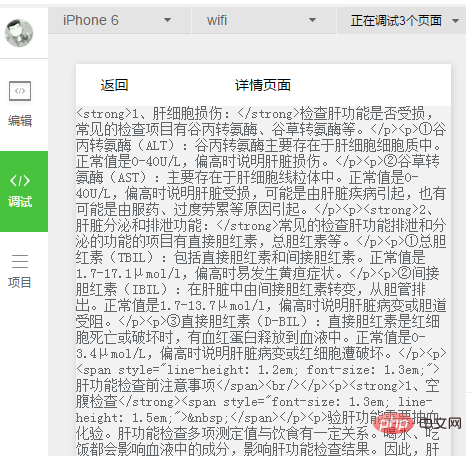
小程序无法解析html
由以上图片看到,小程序无法解析html文件
我们需要处理html富文本内容,让其显示好看点
下面直接上代码了,主要功能就是利用js的replace 对富文本经行处理,大家可以看一下。一起优化,方便对富文本更好的处理。
convertHtmlToText: function convertHtmlToText(inputText) {
var returnText = "" + inputText;
returnText = returnText.replace(/<\\/div>/ig, '\\r\\n');
returnText = returnText.replace(/<\\/li>/ig, '\\r\\n');
returnText = returnText.replace(//ig, ' \* ');
returnText = returnText.replace(/<\\/ul>/ig, '\\r\\n');
//-- remove BR tags and replace them with line break
returnText = returnText.replace(//gi, "\\r\\n");
//-- remove P and A tags but preserve what's inside of them
returnText=returnText.replace(//gi, "\\r\\n");
returnText=returnText.replace(/(.\*?)<\\/a>/gi, " $2 ($1)");
//-- remove all inside SCRIPT and STYLE tags
returnText=returnText.replace(/\[\\w\\W\]{1,}(.\*?)\[\\w\\W\]{1,}<\\/script>/gi, "");
returnText=returnText.replace(/\[\\w\\W\]{1,}(.\*?)\[\\w\\W\]{1,}<\\/style>/gi, "");
//-- remove all else
returnText=returnText.replace(/<(?:.|\\s)\*?>/g, "");
//-- get rid of more than 2 multiple line breaks:
returnText=returnText.replace(/(?:(?:\\r\\n|\\r|\\n)\\s\*){2,}/gim, "\\r\\n\\r\\n");
//-- get rid of more than 2 spaces:
returnText = returnText.replace(/ +(?= )/g,'');
//-- get rid of html-encoded characters:
returnText=returnText.replace(/ /gi," ");
returnText=returnText.replace(/&/gi,"&");
returnText=returnText.replace(/"/gi,'"');
returnText=returnText.replace(//gi,'>');
return returnText;
}
将上面代码放入任意适合的小程序js文件中,
然后在需要处理数据的js文件里,引入文件,下面给出放入app.js文件中的调用示例:
var app = getApp()//获取app小程序实例
onLoad: function (options) {
wx.request({
url: 'http://example.com/api' + options.id+'.json',
headers: {
'Content-Type': 'application/json'
},
success: function (res) {
res.data.content = app.convertHtmlToText(res.data.content )
that.setData({
art: res.data.content
})
console.log(res.data)
}
})
}
然后编译刷新下,可以看到结果了:
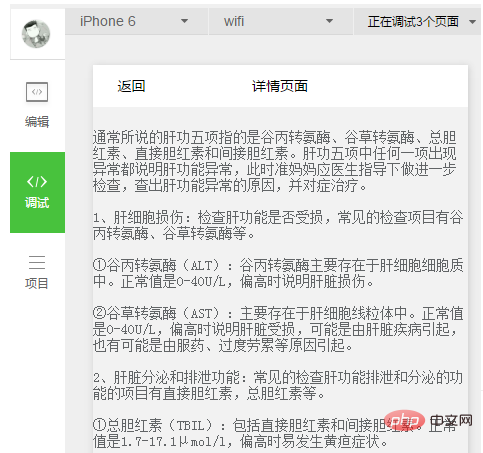
结果
这里可以继续调整下css,使显示得更好看点。
以上就是小程序怎么把富文本转换为文本的详细内容,更多请关注知企PROSAAS其它相关文章!
**Tags:** css, html, JS, 微信小程序, 接口
**Categories:** 后端开发
---