### [微信小程序如何实现获取验证码后倒计时效果?(代码示例)](https://www.prosaas.cn/article/17013)
**Published:** 2018-11-13T07:40:46
**Author:** 5201314
**Excerpt:** 本篇文章给大家带来的内容是介绍微信小程序如何实现获取验证码后倒计时效果?(代码示例)。有一定的参考价值,有需要…
本篇文章给大家带来的内容是介绍微信小程序如何实现获取验证码后倒计时效果?(代码示例)。有一定的参考价值,有需要的朋友可以参考一下,希望对你们有所帮助。
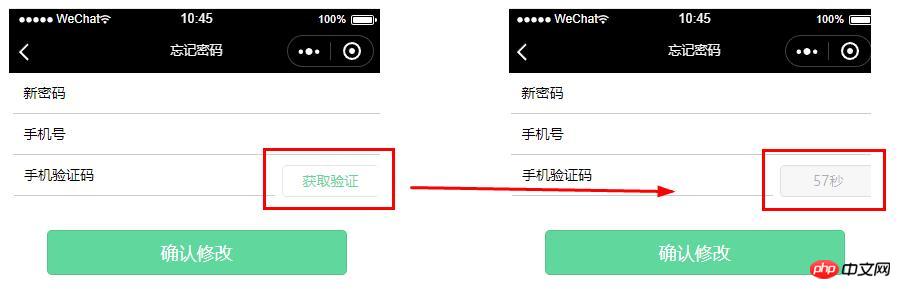
首先我们来看看效果图:
wxml代码:
wxss代码:
/\* pages/forgetpwd/forgetpwd.wxss \*/
input{
padding-left: 20rpx;
border-bottom: 1rpx solid #ccc;
height: 80rpx;
line-height: 80rpx;
width: 95%;
margin: 0 auto;
font-size: 28rpx;
}
.input-verify{
width: 67%;
margin-left: 10rpx;
float: left;
}
.verify-btn{
width: 26%;
height: 65rpx;
float: right;
line-height: 65rpx;
background: #fff;
color: #5FD79D;
margin: 20rpx 10rpx;
font-size: 28rpx;
}
.confirm-btn{
width: 80%;
height: 90rpx;
margin: 150rpx auto;
background: #5FD79D;
color: #fff;
}
js代码:
// pages/forgetpwd/forgetpwd.js
var interval = null //倒计时函数
Page({
/\*\*
\* 页面的初始数据
\*/
data: {
time: '获取验证码', //倒计时
currentTime: 60
},
/\*\*
\* 生命周期函数--监听页面加载
\*/
onLoad: function (options) {
},
getPwd:function(e){
console.log(e.detail.value)
},
/\*\*
\* 确认修改
\*/
confirm\_btn:function(){
wx.redirectTo({
url: '/pages/login/login',
})
},
getCode: function (options){
var that = this;
var currentTime = that.data.currentTime
interval = setInterval(function () {
currentTime--;
that.setData({
time: currentTime+'秒'
})
if (currentTime
总结:以上就是本篇文章的全部内容,希望能对大家的学习有所帮助。
以上就是微信小程序如何实现获取验证码后倒计时效果?(代码示例)的详细内容,更多请关注知企PROSAAS其它相关文章!
**Tags:** JS, 微信小程序
**Categories:** 后端开发
---