### [小程序实现类似于苹果AssistiveTouch功能(附代码)](https://www.prosaas.cn/article/17029)
**Published:** 2018-10-15T06:06:27
**Author:** 5201314
**Excerpt:** 本篇文章给大家带来的内容是关于小程序实现类似于苹果AssistiveTouch功能(附代码),有一定的参考价值…
本篇文章给大家带来的内容是关于小程序实现类似于苹果AssistiveTouch功能(附代码),有一定的参考价值,有需要的朋友可以参考一下,希望对你有所帮助。
一、首先我先介绍一下,我们要做一个什么样的项目功能
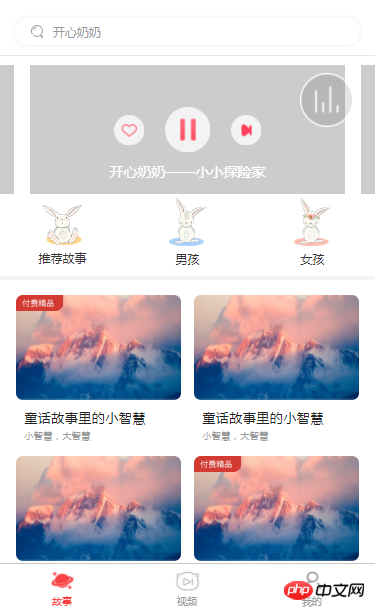
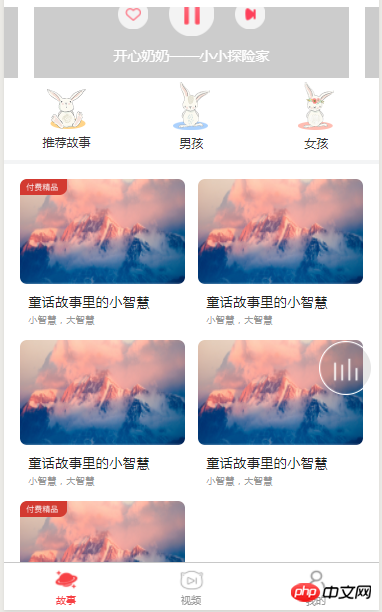
项目功能就是一个音频点击播放,当点击为播放的状态时,一个音频的动图出现,而且是可以跟随着手指的滑动而滑动,而且,在滑动动图的时候,当前下的页面是不可以跟随着我的滑动而上下滚动,当停止滑动的时候,音频动图停靠在手机的左侧或者右侧,而当前下的页面是可以上下滚动的,功能介绍到此为止,下面我们说一下思路。
二、我们做这个功能,第二步就是要想思路
思路就是,利用微信中的滑动事件,外加控制css样式,来完成这个功能。
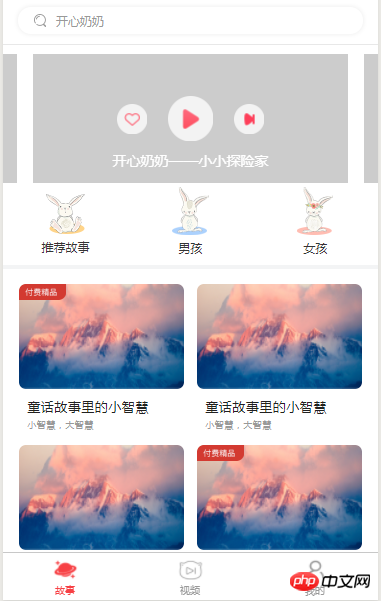
三、这是项目的ui图,废话不多说,直接撸代码。
项目样图
四、index.wxml、index.wxss、index.js页面代码
\*index.wxml页面\*
开心奶奶
开心奶奶——小小探险家
开心奶奶——小小探险家
----------
> 重点!!!!
----------
童话故事里的小智慧
小智慧,大智慧
童话故事里的小智慧
小智慧,大智慧
童话故事里的小智慧
小智慧,大智慧
\*index.wxss样式\*
/\*\*index.wxss\*\*/
.home\_back1{
width: 100%;
}
.home\_back2{
position: fixed;
top: 0;
left: 0;
right: 0;
bottom: 0;
z-index: 10;
}
/\* 搜索 \*/
.home\_srh {
width: 100%;
height: 74rpx;
padding-top: 20rpx;
background: #fff;
border-bottom: 1rpx solid #e8e8e8;
}
.home\_srh .srh\_box {
width: 690rpx;
height: 54rpx;
margin: 0 auto;
box-shadow: 0 0 10rpx 2rpx #f1f1f1;
border-radius: 50rpx;
display: flex;
align-items: center;
}
.home\_srh .srh\_box .srh\_box\_img {
width: 24rpx;
height: 26rpx;
display: inline-block;
margin-left: 32rpx;
margin-right: 20rpx;
}
.home\_srh .srh\_box .srh\_box\_text {
font-size: 24rpx;
color: #999;
}
/\* 音频分类 \*/
/\* banner图 \*/
.home\_ban{
width: 100%;
height: 422rpx;
background: #fff;
padding-top: 18rpx;
}
.home\_ban .page-section{
width: 100%;
height: 258rpx;
position:relative;
z-index: 2;
}
.home\_ban .page-section .swiper-item{
width: 630rpx;
height: 258rpx;
margin: 0 auto;
position: relative;
display: block;
}
.home\_ban .page-section .swiper-item audio{
width: 630rpx;
height: 258rpx;
display: block;
background: #ccc;
}
.home\_ban .page-section .swiper-item .audio\_box {
width: 90rpx;
height: 90rpx;
position: absolute;
left: 50%;
top: 50%;
margin-left: -45rpx;
margin-top: -45rpx;
}
.home\_ban .page-section .swiper-item .audio\_box .audio\_play {
width: 90rpx;
height: 90rpx;
display: block;
background: rgba(0,0,0,0);
}
.home\_ban .page-section .swiper-item .audio\_box .audio\_play image{
width: 90rpx;
height: 90rpx;
display: block;
}
.home\_ban .page-section .swiper-item .audio\_next {
width: 60rpx;
height: 60rpx;
position: absolute;
top: 50%;
margin-top: -30rpx;
right: 169rpx;
}
.home\_ban .page-section .swiper-item .audio\_next image {
width: 60rpx;
height: 60rpx;
display: block;
}
.home\_ban .page-section .swiper-item .audio\_collect {
width: 60rpx;
height: 60rpx;
position: absolute;
top: 50%;
margin-top: -30rpx;
right: 169rpx;
}
.home\_ban .page-section .swiper-item .audio\_collect image {
width: 60rpx;
height: 60rpx;
display: block;
}
.home\_ban .page-section .swiper-item .audio\_collect {
width: 60rpx;
height: 60rpx;
position: absolute;
top: 50%;
margin-top: -30rpx;
left: 169rpx;
}
.home\_ban .page-section .swiper-item .audio\_collect .audio\_coly {
width: 60rpx;
height: 60rpx;
display: block;
background: rgba(0,0,0,0);
}
.home\_ban .page-section .swiper-item .audio\_collect .audio\_coly image {
width: 60rpx;
height: 60rpx;
display: block;
}
.home\_ban .page-section .swiper-item .audio\_text{
width: 100%;
font-size: 28rpx;
color: #fff;
text-align: center;
position: absolute;
bottom: 26rpx;
}
/\* 音频小白点 \*/
.audio\_fre {
width: 108rpx;
height: 108rpx;
position: fixed;
z-index: 99;
}
.audio\_fre .audio\_fre1 {
width: 104rpx;
height: 104rpx;
display: block;
border-radius: 100%;
border: 2rpx solid #fff;
}
.audio\_fre .audio\_fre2 {
width: 60rpx;
height: 60rpx;
position: absolute;
top: 50%;
margin-top: -30rpx;
left: 50%;
margin-left: -30rpx;
}
/\* 菜单分类 \*/
.menu\_ul {
width: 100%;
height: 164rpx;
}
.menu\_ul .menu\_li {
width: 33.3%;
height: 164rpx;
float: left;
text-align: center;
}
.menu\_ul .menu\_li:nth-child(1) image{
width: 78rpx;
height: 80rpx;
display: block;
margin: 0 auto;
margin-top: 23rpx;
}
.menu\_ul .menu\_li:nth-child(2) image{
width: 74rpx;
height: 97rpx;
display: block;
margin: 0 auto;
margin-top: 8rpx;
}
.menu\_ul .menu\_li:nth-child(3) image{
width: 73rpx;
height: 96rpx;
display: block;
margin: 0 auto;
margin-top: 8rpx;
}
.menu\_ul .menu\_li .menu\_text{
width: 100%;
text-align: center;
font-size: 24rpx;
color: #343434;
margin-top: 10rpx;
}
/\* 儿童故事 \*/
.child\_story {
width: 100%;
margin-top: 8rpx;
background: #fff;
}
.child\_story .story\_ul {
padding: 0 32rpx;
padding-top: 30rpx;
overflow: hidden;
}
.child\_story .story\_ul .story\_li {
width: 330rpx;
float: left;
margin-right: 26rpx;
margin-bottom: 30rpx;
}
.child\_story .story\_ul .story\_li:nth-child(2n) {
margin-right: 0;
}
.child\_story .story\_ul .story\_li .story\_li\_img {
width: 330rpx;
height: 210rpx;
border-radius: 14rpx;
position: relative;
overflow: hidden;
}
.child\_story .story\_ul .story\_li .story\_li\_img .story\_li\_img1{
width: 330rpx;
height: 210rpx;
display: block;
}
.child\_story .story\_ul .story\_li .story\_li\_img .story\_li\_img2{
width: 95rpx;
height: 32rpx;
display: block;
position: absolute;
top: 0;
left: 0;
}
.child\_story .story\_ul .story\_li .st\_li\_tit {
width: 90%;
font-size: 26rpx;
color: #212121;
margin-top: 18rpx;
padding: 0 5%;
overflow: hidden;
text-overflow: ellipsis;
white-space: nowrap;
letter-spacing: 0.4rpx;
}
.child\_story .story\_ul .story\_li .st\_li\_sec {
width: 90%;
font-size: 18rpx;
color: #999;
margin-top: 6rpx;
padding: 0 5%;
letter-spacing: 0.2rpx;
}
\*index.js页面\*
//index.js
var app = getApp();
Page({
/\*\*
\* 页面的初始数据
\*/
data: {
adply1: true,
adply2: false,
adcol1: true,
adcol2: false,
adFre: false,
funBun: false,
curr\_index: 0,
screenHeight: 0,
screenWidth: 0,
top: 65,
left: 300,
right: 0,
home\_back: 'home\_back1'
},
/\*\*
\* 生命周期函数--监听页面加载
\*/
onLoad: function (options) {
//获取屏幕宽高
var that = this;
wx.getSystemInfo({
success: function (res) {
console.log(res.windowWidth)//手机可用屏幕宽度
console.log(res.windowHeight)//手机可用屏幕高度
that.setData({
screenHeight: res.windowHeight,
screenWidth: res.windowWidth,
});
}
});
},
/\*\*
\* 生命周期函数--监听页面初次渲染完成
\*/
onReady: function (e) {
let that = this;
that.audioCtx = wx.createAudioContext('myAudio')
},
/\*\*
\* 生命周期函数--监听页面显示
\*/
onShow: function () {
},
/\*\*
\* 生命周期函数--监听页面隐藏
\*/
onHide: function () {
},
/\*\*
\* 生命周期函数--监听页面卸载
\*/
onUnload: function () {
},
/\*\*
\* 页面相关事件处理函数--监听用户下拉动作
\*/
onPullDownRefresh: function () {
},
/\*\*
\* 页面上拉触底事件的处理函数
\*/
onReachBottom: function () {
},
/\*\*
\* 用户点击右上角分享
\*/
onShareAppMessage: function () {
},
/\*\*
\* 跳转搜索页面
\*/
srhBox: function () {
let that = this;
wx.navigateTo({
url: '../search/index',
})
},
/\*\*
\* 点击播放
\*/
audioPlay: function () {
var that = this;
that.audioCtx.play();
that.setData({
adply1: false,
adply2: true,
adFre: true,
// isScroll: that.data.isScroll
})
},
/\*\*
\* 点击暂停
\*/
audioPause: function () {
var that = this;
that.audioCtx.pause();
that.setData({
adply1: true,
adply2: false,
adFre: false,
// isScroll: that.data.isScroll
})
},
/\*\*
\* 点击收藏
\*/
audioColy: function () {
var that = this;
that.setData({
adcol1: false,
adcol2: true,
})
},
/\*\*
\* 点击未收藏
\*/
audioColn: function () {
var that = this;
that.setData({
adcol1: true,
adcol2: false,
})
},
/\*\*
\* 跳转故事详情
\*/
storySec: function () {
let that = this;
wx.navigateTo({
url: '../audio/index',
})
},
/\*\*
\* 点击切换
\*/
menuLi: function (e) {
let that = this;
// console.log (e);
let id = e.currentTarget.id;
that.setData({
curr\_index: id
})
},
/\*\*
\* 音频小白点滑动
\*/
//滑动移动事件
handletouchmove: function (e) {
let that = this;
let clientX = e.touches\[0\].clientX;
let clientY = e.touches\[0\].clientY;
//屏幕边界判断
if (clientX < 20 || clientY < 20)
return;
if (clientX > that.data.screenWidth - 20)
return;
if (clientY > that.data.screenHeight - 20)
return;
that.setData({
left: e.touches\[0\].clientX - 20,
top: e.touches\[0\].clientY - 20,
right: e.touches\[0\].clientX - 20,
home\_back: 'home\_back2'
})
},
//滑动结束事件
handletouchend: function (e) {
let that = this;
if ( that.data.left
以上就是小程序实现类似于苹果AssistiveTouch功能(附代码)的详细内容,更多请关注知企PROSAAS其它相关文章!
**Tags:** css, iphone, JS, ui, 事件
**Categories:** 后端开发
---