### [微信小程序商城开发之实现用户收货地址管理页面的代码](https://www.prosaas.cn/article/17110)
**Published:** 2018-08-16T09:08:46
**Author:** 5201314
**Excerpt:** 本篇文章给大家带来的内容是关于微信小程序商城开发之实现用户收货地址管理页面的代码 ,有一定的参考价值,有需要的…
本篇文章给大家带来的内容是关于微信小程序商城开发之实现用户收货地址管理页面的代码 ,有一定的参考价值,有需要的朋友可以参考一下,希望对你有所帮助。
**看效果**
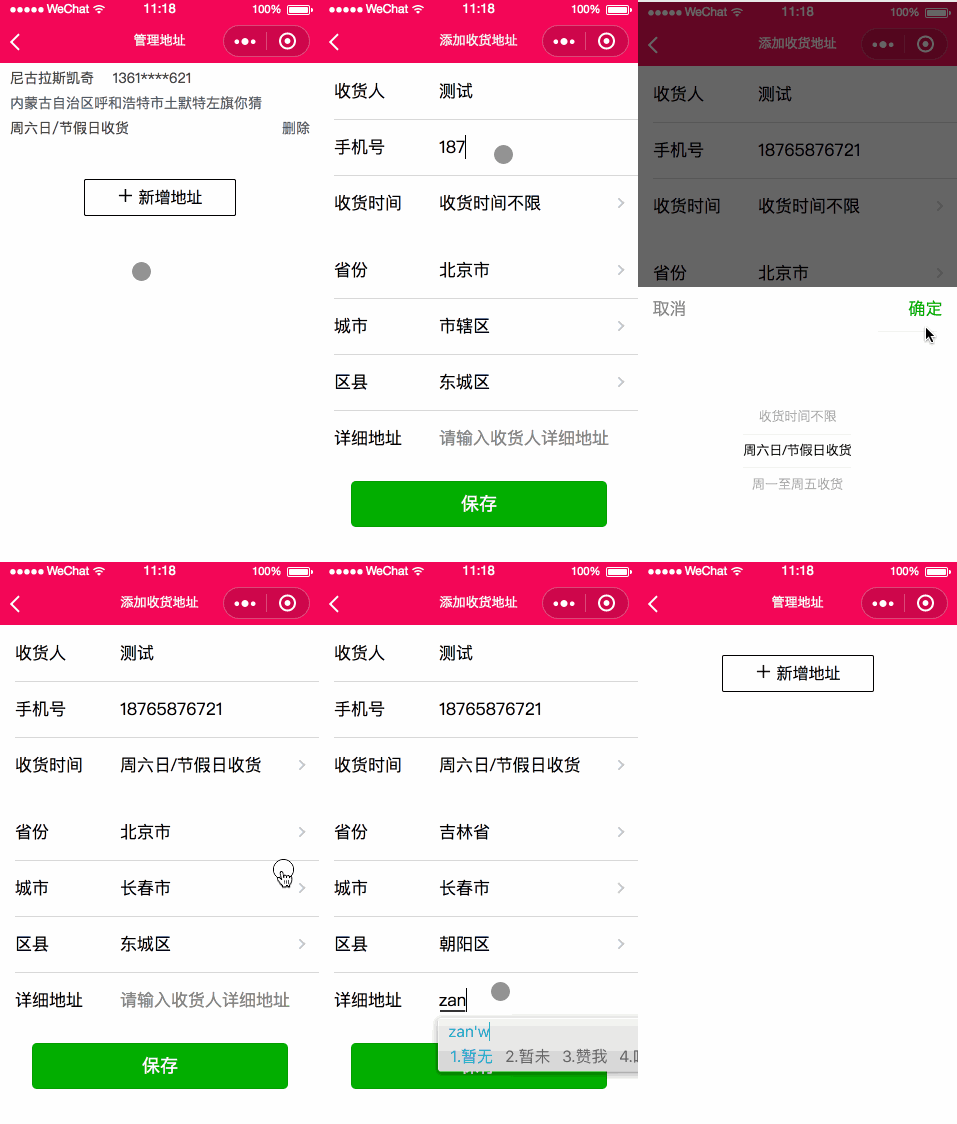
**开发计划**
1、布局收货地址列表和新增收货地址页面
2、实现省市县三级联动功能
3、使用缓存管理数据
**一、收货地址列表管理**
**addressList.wxml**
{{item.consignee}}
{{item.mobile}}
{{item.address}}
{{item.transportDay}}
删除
新增地址
**addressList.wxss**
page{
display: flex;
flex-direction: column;
height: 100%;
}
.product-name-wrap{
margin: 0px 10px;
font-size: 14px;
color: #404040;
}
.ui-list-item-info{
margin: 5px 0px;
}
.ui-list-item-address{
color: #585c64;
}
.ui-list-item-time{
margin: 5px 0px;
}
.ui-list-item-del{
position: absolute;
right: 10px;
color: #585c64;
}
/\* 分割线 \*/
.separate {
margin: 5px 0px;
height: 2rpx;
background-color: #f2f2f2;
}
.add-address{
margin: 0 auto;
margin-top: 30px;
width: 150px;
height: 35px;
border: 1px #000 solid;
line-height: 35px;
text-align: center;
color: #000;
border-radius: 5rpx;
display: block;
}
.add-img{
margin-right: 15rpx;
width: 15px;
height: 15px;
}
**addressList.json**
{
"navigationBarTitleText": "管理地址"
}
**addressList.js**
Page({
/\*\*
\* 页面的初始数据
\*/
data: {
addressList:\[\]
},
/\*\*
\* 生命周期函数--监听页面加载
\*/
onLoad: function (options) {
var arr = wx.getStorageSync('addressList') || \[\];
console.info("缓存数据:" + arr);
// 更新数据
this.setData({
addressList: arr
});
},
/\*\*
\* 生命周期函数--监听页面显示
\*/
onShow: function () {
this.onLoad();
},
addAddress:function(){
wx.navigateTo({ url: '../address/address' });
},
/\* 删除item \*/
delAddress: function (e) {
this.data.addressList.splice(e.target.id.substring(3), 1);
// 更新data数据对象
if (this.data.addressList.length > 0) {
this.setData({
addressList: this.data.addressList
})
wx.setStorageSync('addressList', this.data.addressList);
} else {
this.setData({
addressList: this.data.addressList
})
wx.setStorageSync('addressList', \[\]);
}
}
})
**二、新增收货信息**
**address.wxml**
**address.wxss**
@import '../../utils/weui.wxss';
.weui-cells:before{
top:0;
border-top:1rpx solid white;
}
.weui-cell{
line-height: 3.5rem;
}
.weui-cells:after{
bottom:0;border-bottom:1rpx solid white
}
.weui-btn{
width: 80%;
}
**address.json**
{
"navigationBarTitleText": "添加收货地址"
}
**address.js**
var area = require('../../utils/area.js');
var areaInfo = \[\]; //所有省市区县数据
var provinces = \[\]; //省
var provinceNames = \[\]; //省名称
var citys = \[\]; //城市
var cityNames = \[\]; //城市名称
var countys = \[\]; //区县
var countyNames = \[\]; //区县名称
var value = \[0, 0, 0\]; //数据位置下标
var addressList = null;
Page({
/\*\*
\* 页面的初始数据
\*/
data: {
transportValues: \["收货时间不限", "周六日/节假日收货", "周一至周五收货"\],
transportIndex: 0,
provinceIndex: 0, //省份
cityIndex: 0, //城市
countyIndex: 0, //区县
},
/\*\*
\* 生命周期函数--监听页面加载
\*/
onLoad: function(options) {
},
/\*\*
\* 生命周期函数--监听页面显示
\*/
onShow: function() {
var that = this;
area.getAreaInfo(function(arr) {
areaInfo = arr;
//获取省份数据
that.getProvinceData();
});
},
// 获取省份数据
getProvinceData: function() {
var that = this;
var s;
provinces = \[\];
provinceNames = \[\];
var num = 0;
for (var i = 0; i < areaInfo.length; i++) {
s = areaInfo\[i\];
if (s.di == "00" && s.xian == "00") {
provinces\[num\] = s;
provinceNames\[num\] = s.name;
num++;
}
}
that.setData({
provinceNames: provinceNames
})
that.getCityArr();
that.getCountyInfo();
},
// 获取城市数据
getCityArr: function(count = 0) {
var c;
citys = \[\];
cityNames = \[\];
var num = 0;
for (var i = 0; i < areaInfo.length; i++) {
c = areaInfo\[i\];
if (c.xian == "00" && c.sheng == provinces\[count\].sheng && c.di != "00") {
citys\[num\] = c;
cityNames\[num\] = c.name;
num++;
}
}
if (citys.length == 0) {
citys\[0\] = {
name: ''
};
cityNames\[0\] = {
name: ''
};
}
var that = this;
that.setData({
citys: citys,
cityNames: cityNames
})
console.log('cityNames:' + cityNames);
that.getCountyInfo(count, 0);
},
// 获取区县数据
getCountyInfo: function(column0 = 0, column1 = 0) {
var c;
countys = \[\];
countyNames = \[\];
var num = 0;
for (var i = 0; i < areaInfo.length; i++) {
c = areaInfo\[i\];
if (c.xian != "00" && c.sheng == provinces\[column0\].sheng && c.di == citys\[column1\].di) {
countys\[num\] = c;
countyNames\[num\] = c.name;
num++;
}
}
if (countys.length == 0) {
countys\[0\] = {
name: ''
};
countyNames\[0\] = {
name: ''
};
}
console.log('countyNames:' + countyNames);
var that = this;
// value = \[column0, column1, 0\];
that.setData({
countys: countys,
countyNames: countyNames,
// value: value,
})
},
bindTransportDayChange: function(e) {
console.log('picker country 发生选择改变,携带值为', e.detail.value);
this.setData({
transportIndex: e.detail.value
})
},
bindProvinceNameChange: function(e) {
var that = this;
console.log('picker province 发生选择改变,携带值为', e.detail.value);
var val = e.detail.value
that.getCityArr(val); //获取地级市数据
that.getCountyInfo(val, 0); //获取区县数据
value = \[val, 0, 0\];
this.setData({
provinceIndex: e.detail.value,
cityIndex: 0,
countyIndex: 0,
value: value
})
},
bindCityNameChange: function(e) {
var that = this;
console.log('picker city 发生选择改变,携带值为', e.detail.value);
var val = e.detail.value
that.getCountyInfo(value\[0\], val); //获取区县数据
value = \[value\[0\], val, 0\];
this.setData({
cityIndex: e.detail.value,
countyIndex: 0,
value: value
})
},
bindCountyNameChange: function(e) {
var that = this;
console.log('picker county 发生选择改变,携带值为', e.detail.value);
this.setData({
countyIndex: e.detail.value
})
},
saveAddress: function(e) {
var consignee = e.detail.value.consignee;
var mobile = e.detail.value.mobile;
var transportDay = e.detail.value.transportDay;
var provinceName = e.detail.value.provinceName;
var cityName = e.detail.value.cityName;
var countyName = e.detail.value.countyName;
var address = e.detail.value.address;
console.log(transportDay + "," + provinceName + "," + cityName + "," + countyName + "," + address); //输出该文本
var arr = wx.getStorageSync('addressList') || \[\];
console.log("arr,{}", arr);
addressList = {
consignee: consignee,
mobile: mobile,
address: provinceName + cityName + countyName+address,
transportDay: transportDay
}
arr.push(addressList);
wx.setStorageSync('addressList', arr);
wx.navigateBack({
})
}
})
**area.js和weui.wxss 可以看下方源码获取方式,这里就不多做解释。**
相关推荐:
微信小程序商城开发之用微信授权并实现个人中心的页面代码
微信小程序商城开发之实现商品加入购物车的功能(代码)
微信小程序商城开发之https框架的搭建以及顶部和底部导航的实现
以上就是微信小程序商城开发之实现用户收货地址管理页面的代码的详细内容,更多请关注知企PROSAAS其它相关文章!
**Categories:** 后端开发
---