### [微信小程序商城开发之用微信授权并实现个人中心的页面代码](https://www.prosaas.cn/article/17111)
**Published:** 2018-08-16T09:03:37
**Author:** 5201314
**Excerpt:** 本篇文章给大家带来的内容是关于微信小程序商城开发之用微信授权并实现个人中心的页面代码,有一定的参考价值,有需要…
本篇文章给大家带来的内容是关于微信小程序商城开发之用微信授权并实现个人中心的页面代码,有一定的参考价值,有需要的朋友可以参考一下,希望对你有所帮助。
看效果
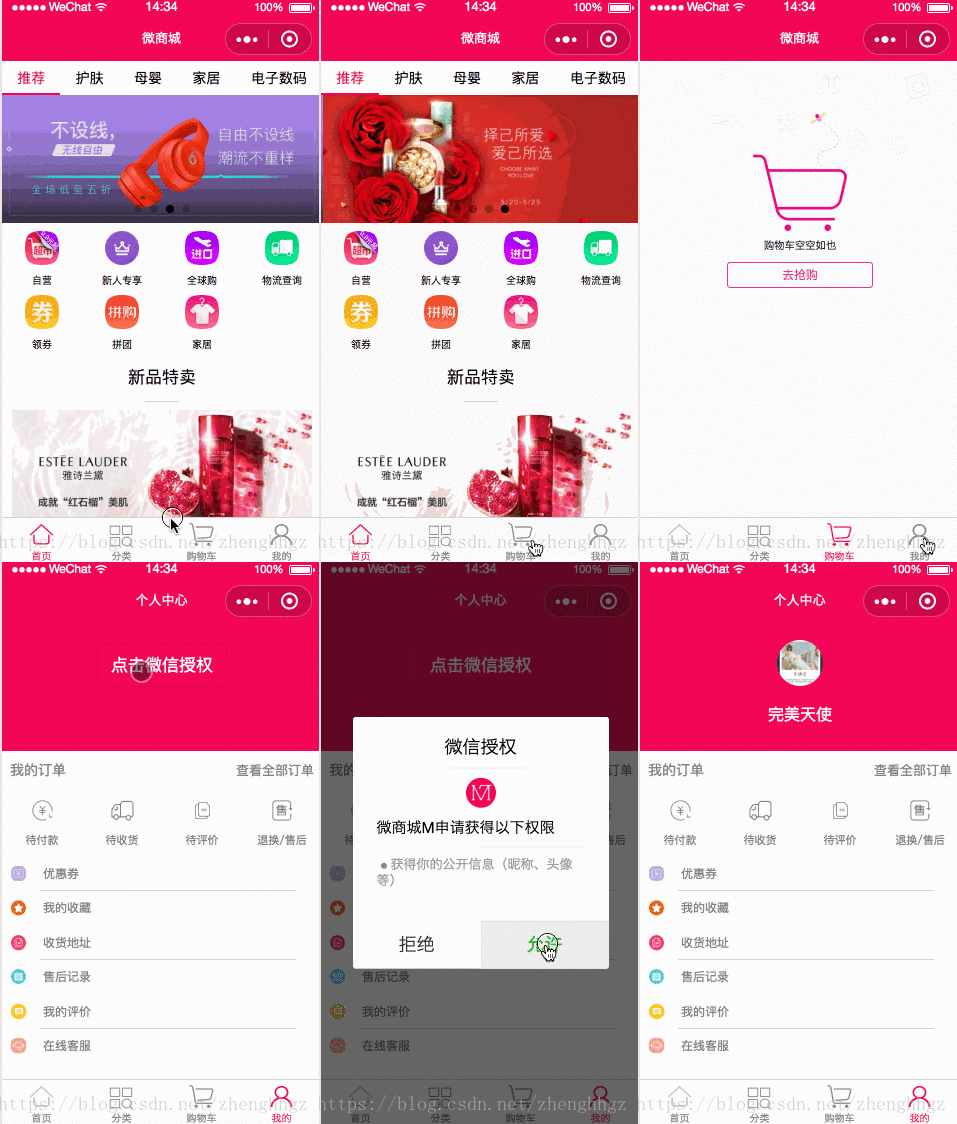
开发计划
1、实现微信授权并获取用户信息
2、个人中心页面布局
一、实现微信授权并获取用户信息
mine.js
onLoad: function () {
if (app.globalData.userInfo) {
this.setData({
userInfo: app.globalData.userInfo,
hasUserInfo: true
})
} else if (this.data.canIUse) { // 由于 getUserInfo 是网络请求,可能会在 Page.onLoad 之后才返回
// 所以此处加入 callback 以防止这种情况
app.userInfoReadyCallback = res => { this.setData({ userInfo: res.userInfo, hasUserInfo: true
})
}
} else { // 在没有 open-type=getUserInfo 版本的兼容处理
wx.getUserInfo({ success: res => {
app.globalData.userInfo = res.userInfo this.setData({ userInfo: res.userInfo, hasUserInfo: true
})
}
})
}
},
getUserInfo: function (e) {
console.log(e)
app.globalData.userInfo = e.detail.userInfo
this.setData({
userInfo: e.detail.userInfo,
hasUserInfo: true
})
}
二、实现微信授权并获取用户信息
mine.wxml
{{userInfo.nickName}}
我的订单
查看全部订单
{{item.name}}
优惠券
我的收藏
收货地址
售后记录
我的评价
在线客服
mine.wxss
.userinfo {
display: flex;
flex-direction: column;
align-items: center;
background: #f0145a;
width: 100%;
height: 300rpx;
}
.userinfo-btn{
margin-top: 50rpx;
background: none !important;
color: #fff !important;
font-size: 40rpx;
}
.account-bg {
width: 100%;
height: 150rpx;
}
.userinfo-avatar {
width: 108rpx;
height: 108rpx;
margin: 40rpx;
border-radius: 50%;
}
.userinfo-nickname {
color: #fff;
}
/\* 订单 \*/
.order {
display: flex;
flex-direction: row;
align-items: center;
width: 100%;
height: 90rpx;
}
.myorder-text {
font-size: 34rpx;
color: gray;
margin: 20rpx;
width: 40%;
}
.myorderlook-text {
font-size: 32rpx;
color: gray;
position: relative;
right: 20rpx;
width: 60%;
text-align: right;
}
.next-image {
width: 20rpx;
height: 25rpx;
position: relative;
right: 10rpx;
}
.navs {
display: flex;
}
.nav-item {
width: 25%;
display: flex;
align-items: center;
flex-direction: column;
padding: 20rpx;
}
.nav-item .nav-image {
width: 55rpx;
height: 55rpx;
margin: 5rpx;
}
.nav-item text {
margin-top: 20rpx;
font-size: 28rpx;
color: gray;
}
/\* 列表 \*/
.person-list {
display: flex;
flex-direction: column;
align-items: left;
}
.list-item {
display: flex;
flex-direction: row;
align-items: center;
height: 80rpx;
}
.item-image {
width: 40rpx;
height: 40rpx;
margin: 20rpx;
}
.item-text {
color: gray;
font-size: 30rpx;
margin-left: 20rpx;
}
.person-line {
width: 80%;
height: 2rpx;
background: lightgray;
margin-left: 90rpx;
}
mine.js
var app = getApp()
Page({
data: {
userInfo: {},
hasUserInfo: false,
canIUse: wx.canIUse('button.open-type.getUserInfo'),
orderItems: \[
{
typeId: 0,
name: '待付款',
url: 'bill',
imageurl: '../../images/person/personal\_pay.png',
},
{
typeId: 1,
name: '待收货',
url: 'bill',
imageurl: '../../images/person/personal\_receipt.png',
},
{
typeId: 2,
name: '待评价',
url: 'bill',
imageurl: '../../images/person/personal\_comment.png'
},
{
typeId: 3,
name: '退换/售后',
url: 'bill',
imageurl: '../../images/person/personal\_service.png'
}
\],
},
//事件处理函数
toOrder: function () {
wx.navigateTo({ url: '../order/order'
})
}
}
mine.json
{ "navigationBarTitleText": "个人中心"}
相关推荐:
微信小程序商城开发之实现商品加入购物车的功能(代码)
微信小程序商城开发之动态API实现特卖商品的流式布局代码
微信小程序商城开发之动态API实现商品的详情页的代码(下)
以上就是微信小程序商城开发之用微信授权并实现个人中心的页面代码的详细内容,更多请关注知企PROSAAS其它相关文章!
**Categories:** 后端开发
---