### [微信小程序实例:如何实现跑马灯的动画效果(附代码)](https://www.prosaas.cn/article/17167)
**Published:** 2018-08-10T07:20:46
**Author:** 5201314
**Excerpt:** 本篇文章给大家带来的内容是关于微信小程序实例:如何实现跑马灯的动画效果(附代码),有一定的参考价值,有需要的朋…
本篇文章给大家带来的内容是关于微信小程序实例:如何实现跑马灯的动画效果(附代码),有一定的参考价值,有需要的朋友可以参考一下,希望对你有所帮助。
一:功能介绍及讲解
实现的跑马灯(跑马灯里面显示文章的title)的效果,并在右侧有个查看文章的按钮,按钮绑定当前的跑马灯信息的id,点击按钮后根据id跳转到相应的文章详情页;
这里值得注意的点是我用了swiper组件的 bindchange 事件来获取到当前信息的数组下标,实现了动态改变查看按钮绑定信息id值的效果;
二:完整源码
1.封装成一个组件:
查看
公告
{{item.title}}
.sx\_lunbo {
width: 100%;
height: 60rpx;
border-bottom: solid 1px #eee;
}
.chakan{
padding-left: 25rpx;
right: 20rpx;
clear: both;
position:absolute;
height: 40rpx;
margin-top: 10rpx;
color: #f63;
border:solid 1px #f63;
border-radius:5rpx;
padding: 0rpx 10rpx 0rpx 10rpx;
font-size: 28rpx
}
.sx\_swiper {
width: 550rpx;
margin-top: 10rpx;
}
.sx\_swiper swiper-item{
height: 40rpx
}
.reds {
overflow: hidden;
text-overflow: ellipsis;
white-space:nowrap;
width:500rpx;
font-size: 28rpx;
height: 40rpx;
}
.red {
font-size: 24rpx;
color: white;
width: 60rpx;
height: 40rpx;
line-height: 40rpx;
background: blue;
padding-left: 10rpx;
margin: 10rpx;
border-radius: 10rpx;
}
2.在页面调用:
@import "../template/roll/roll.wxss";
newsId: function (e) {
var that = this
var item = e.detail.current;
this.setData({
newsId:that.data.news\[item\].id
})
},
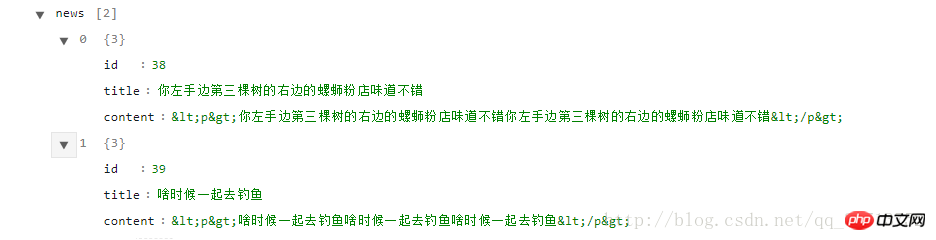
3.news的数据:
相关推荐:
微信小程序实例:收藏与取消收藏图片以及切换图片的功能效果
微信小程序实例:如何实现滑动选择器(附代码)
以上就是微信小程序实例:如何实现跑马灯的动画效果(附代码)的详细内容,更多请关注知企PROSAAS其它相关文章!
**Categories:** 后端开发
---