### [微信小程序自定义底部tarbar的代码实现](https://www.prosaas.cn/article/17173)
**Published:** 2018-08-10T06:41:34
**Author:** 5201314
**Excerpt:** 本篇文章给大家带来的内容是关于微信小程序自定义底部tarbar的代码实现,有一定的参考价值,有需要的朋友可以参…
本篇文章给大家带来的内容是关于微信小程序自定义底部tarbar的代码实现,有一定的参考价值,有需要的朋友可以参考一下,希望对你有所帮助。
先看一看目录
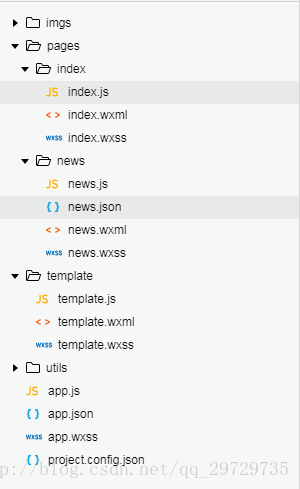
template文件夹里存放tabbar模板。
template/template.wxml
{{item.text}}
template.css
.icon{
width:54rpx;
height: 54rpx;
}
.tabBar{
width:100%;
position: fixed;
bottom:0;
padding:10rpx;
margin-left:-4rpx;
background:#F7F7FA;
font-size:20rpx;
color:#8A8A8A;
box-shadow: 6rpx 6rpx 6rpx 6rpx #aaa;
}
.tabBar-item{
float:left;
width:25%;
text-align: center;
overflow: hidden;
}
/\*当前字体颜色\*/
.tabBartext{
color:red;
}
template.js
//初始化数据
function tabbarinit() {
return \[
{ "current":0,
"pagePath": "/pages/index/index",
"iconPath": "/imgs/home.png",
"selectedIconPath": "/imgs/home\_on.png",
"text": "主页"
},
{
"current": 0,
"pagePath": "/pages/news/news",
"iconPath": "/imgs/message.png",
"selectedIconPath": "/imgs/message\_on.png",
"text": "资讯"
},
{
"current": 0,
"pagePath": "/pages/category/category",
"iconPath": "/imgs/category.png",
"selectedIconPath": "/imgs/category\_on.png",
"text": "分类"
},
{
"current": 0,
"pagePath": "/pages/buy/buy",
"iconPath": "/imgs/buy.png",
"selectedIconPath": "/imgs/buy\_on.png",
"text": "购物"
}
\]
}
//tabbar 主入口
function tabbarmain(bindName = "tabdata", id, target) {
var that = target;
var bindData = {};
var otabbar = tabbarinit();
otabbar\[id\]\['iconPath'\] = otabbar\[id\]\['selectedIconPath'\]//换当前的icon
otabbar\[id\]\['current'\] = 1;
bindData\[bindName\] = otabbar
that.setData({ bindData });
}
module.exports = {
tabbar: tabbarmain
}
到此改组件完成,然后讲解一下使用方法。
我们先把样式载入到app.wxss
@import "/template/template.wxss";
- 在index文件夹
index.wxml
index.js
const app = getApp()
var template = require('../../template/template.js');
Page({
data: {
},
onLoad: function () {
template.tabbar("tabBar", 0, this)//0表示第一个tabbar
},
})
news.wxml与index.wxml一样
news.js如下
const app = getApp()
var template = require('../../template/template.js');
Page({
data: { },
onLoad: function () {
template.tabbar("tabBar", 1, this)//1表示第二个tabbar
},
})
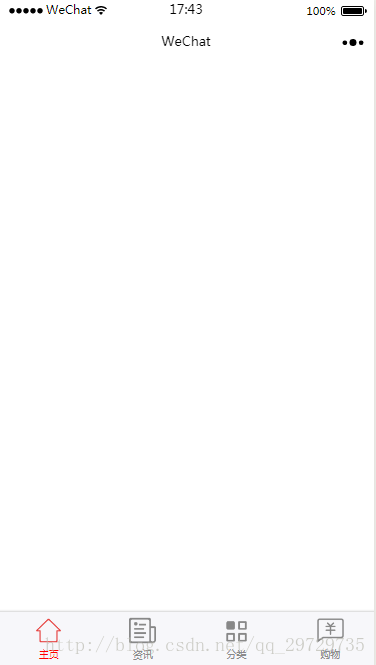
效果如图
相关推荐:
微信小程序实例:实现顶部tab切换以及滑动切换时导航栏会随着移动的效果(代码)
微信小程序实例:获取当前城市位置及再次授权地理位置的代码实现
以上就是微信小程序自定义底部tarbar的代码实现的详细内容,更多请关注知企PROSAAS其它相关文章!
**Categories:** 后端开发
---