### [微信小程序中如何自定义showmodal弹出框(附代码)](https://www.prosaas.cn/article/17178)
**Published:** 2018-08-10T06:11:44
**Author:** 5201314
**Excerpt:** 本篇文章给大家带来的内容是关于微信小程序中如何自定义showmodal弹出框(附代码),有一定的参考价值,有需…
本篇文章给大家带来的内容是关于微信小程序中如何自定义showmodal弹出框(附代码),有一定的参考价值,有需要的朋友可以参考一下,希望对你有所帮助。
最近一直忙着修改bug 增加新功能,好久没总结了,也不知道该总结啥,先写一个自定义showmodal框吧
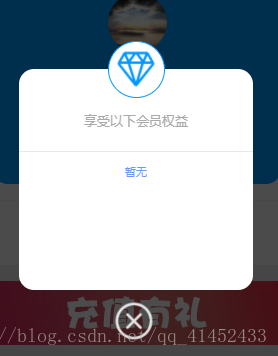
废话少说直接上代码
wxml部分
{{uservip}}
享受以下会员权益
{{vipinfo}}
wxss部分
.mask{
width: 100%;
height: 100%;
position: fixed;
top: 0;
left: 0;
background: #000;
z-index: 9000;
opacity: 0.7;
}
.modalDlg{
width: 550rpx;
height: 520rpx;
position: fixed;
top: 25%;
z-index: 9999;
margin: 0rpx 100rpx 185rpx 100rpx;
background-color: #fff;
border-radius: 36rpx;
display: flex;
flex-direction: column;
align-items: center;
}
其中 mask 是遮罩层样式
modalDlg是弹出去的容器样式
其他的就是很随意的,自己想写什么写什么。
.img\_wrap{
width: 130rpx;
height: 130rpx;
background: white;
border-radius:50%;
border:1px solid #0097ff;
margin: 0rpx auto;
position: absolute;
top: -65rpx;
margin-bottom: 30rpx;
}
.img\_wrap image{
width: 100rpx;
height: 100rpx;
padding-top:15rpx;
padding-left:15rpx;
margin: 0rpx auto;
}
.useralert\_huiyuan
{
font-size: 13px;
margin-top: 100rpx;
}
.useralert\_quanyi
{
font-size: 13px;
color: darkgray;
}
.fenggexian{
width: 100%;
margin-top: 50rpx;
border-bottom:1px solid #e8e8e8;
}
.vipinfo{
margin-top: 30rpx;
color: #6698ff;
font-size: 11px;
}
.shutalert{
width: 110rpx;
margin: 0rpx auto
}
.shutalert image{
width: 100rpx;
height: 100rpx;
position: absolute;
bottom: -120rpx;
}
其中 mask 是遮罩层样式
modalDlg是弹出去的容器样式
其他的就是很随意的,自己想写什么写什么。
js部分
在data\[\]里定义一个showModal : false 初始一定为false
我是因为需要分开写了两个方法来控制开关,比较死板,这样的
submit: function() {
this.setData({
showModal: true
})
},
go: function() {
this.setData({
showModal: false
})
},
有一种更直接的
可以一个方法控制开关,也可用于mask遮罩层,点击遮罩层,关闭
在此我随意写下
在data里定义一个showalert : false
方法:
alert: function() {
var that= this;
this.setData({
showalert: !that.data.showalert
})
},
自定义弹框想怎么用怎么用
相关推荐:
微信小程序中如何实现列表渲染多层嵌套循环
利用微信小程序中Canvas API来合成海报生成组件封装
微信小程序更新webview页面的三种方法
以上就是微信小程序中如何自定义showmodal弹出框(附代码)的详细内容,更多请关注知企PROSAAS其它相关文章!
**Tags:** bug, canvas, JS, webview, 封装, 循环, 微信小程序
**Categories:** 后端开发
---