### [微信小程序商城项目中商品属性分类的实现](https://www.prosaas.cn/article/17279)
**Published:** 2018-06-27T07:06:57
**Author:** 5201314
**Excerpt:** 这篇文章主要为大家详细介绍了微信小程序商城项目之商品属性值联动选择,具有一定的参考价值,感兴趣的小伙伴们可以参…
这篇文章主要为大家详细介绍了微信小程序商城项目之商品属性值联动选择,具有一定的参考价值,感兴趣的小伙伴们可以参考一下
续上一篇的文章:微信小程序之购物数量加减
所提及的购物数量的加减,现在说说商品属性值联动选择。
为了让同学们有个直观的了解,到电商网截了一个图片,就是红圈所示的部分
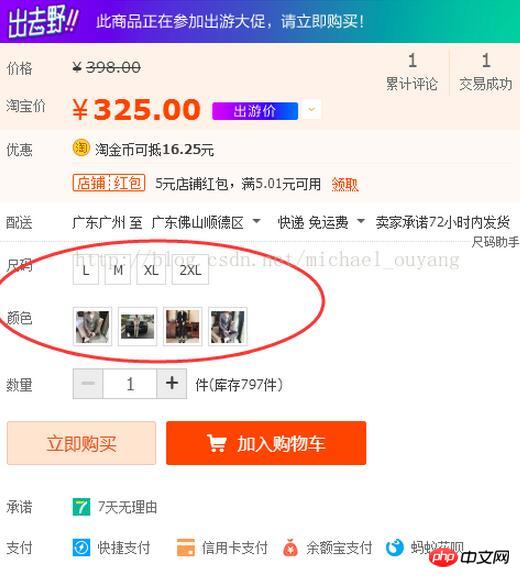
现在就为大家介绍这个小组件,在小程序中,该如何去写
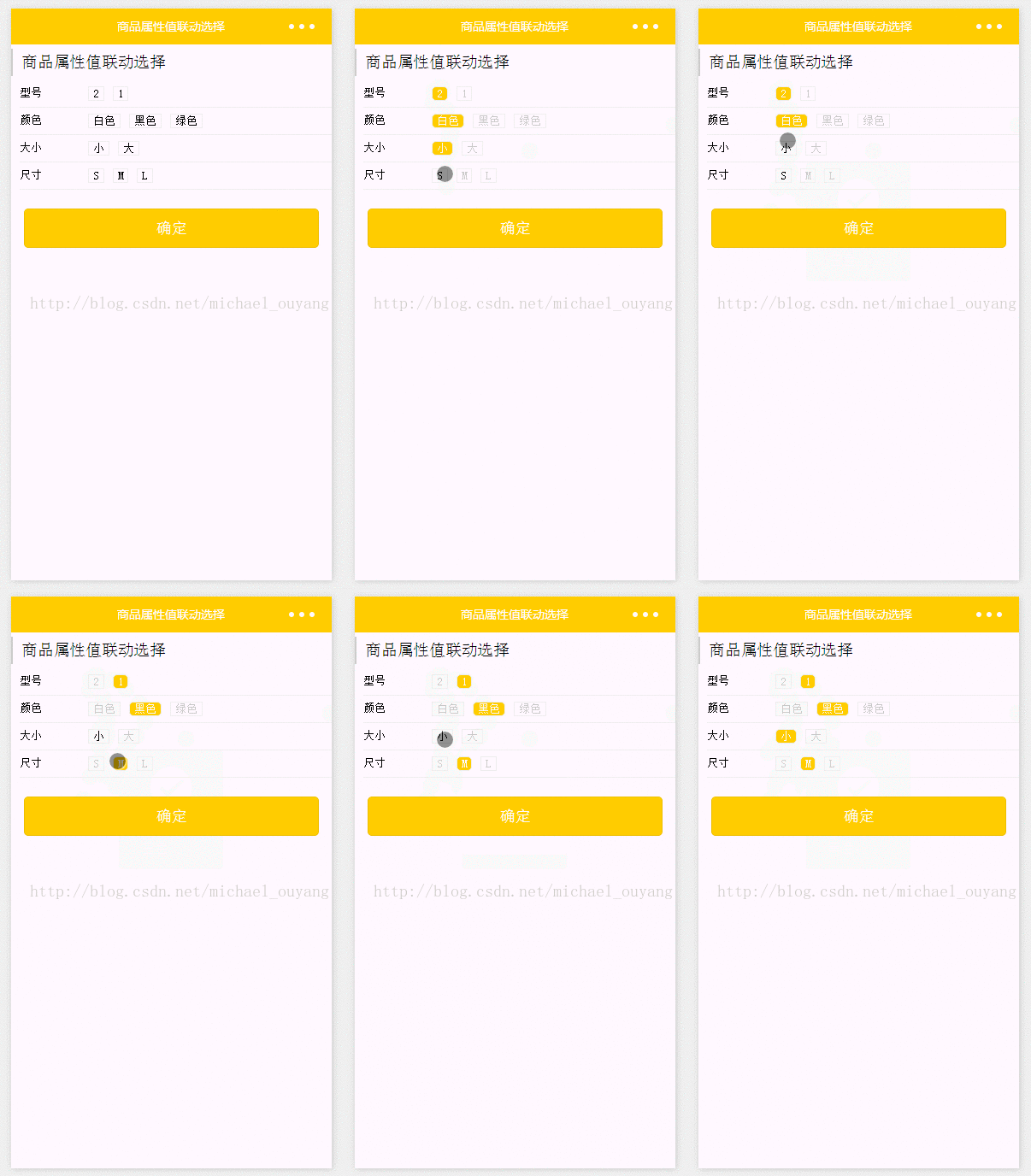
下图为本项目的图:

wxml:
商品属性值联动选择
{{attrValueObj.attrKey}}
{{value}}
wxss:
.title {
padding: 10rpx 20rpx;
margin: 10rpx 0;
border-left: 4rpx solid #ccc;
}
/\*全部属性的主盒子\*/
.commodity\_attr\_list {
background: #fff;
padding: 0 20rpx;
font-size: 26rpx;
overflow: hidden;
width: 100%;
}
/\*每组属性的主盒子\*/
.attr\_box {
width: 100%;
overflow: hidden;
border-bottom: 1rpx solid #ececec;
}
/\*属性名\*/
.attr\_name {
width: 20%;
float: left;
padding: 15rpx 0;
}
/\*属性值\*/
.attr\_value\_box {
width: 80%;
float: left;
padding: 15rpx 0;
overflow: hidden;
}
/\*每个属性值\*/
.attr\_value {
float: left;
padding: 0 10rpx;
margin: 0 10rpx;
border: 1rpx solid #ececec;
}
/\*每个属性选中的当前样式\*/
.attr\_value\_active {
background: #FFCC00;
border-radius: 10rpx;
color: #fff;
padding: 0 10rpx;
}
/\*禁用属性\*/
.attr\_value\_disabled {
color: #ccc;
}
/\*button\*/
.btn-area {
margin: 1.17647059em 15px 0.3em;
}
.btn {
margin-top: 15px;
background-color:#FFCC00;
color: #fff;
}
.btn:first-child {
margin-top: 0;
}
js:
数据部分,一般情况都是访问接口获取数据的,这里并没有使用网络访问,为了简化demo,直接把一组数据放在data对象中。
Page({
data: {
firstIndex: -1,
//准备数据
//数据结构:以一组一组来进行设定
commodityAttr: \[
{
priceId: 1,
price: 35.0,
"stock": 8,
"attrValueList": \[
{
"attrKey": "型号",
"attrValue": "2"
},
{
"attrKey": "颜色",
"attrValue": "白色"
},
{
"attrKey": "大小",
"attrValue": "小"
},
{
"attrKey": "尺寸",
"attrValue": "S"
}
\]
},
{
priceId: 2,
price: 35.1,
"stock": 9,
"attrValueList": \[
{
"attrKey": "型号",
"attrValue": "1"
},
{
"attrKey": "颜色",
"attrValue": "黑色"
},
{
"attrKey": "大小",
"attrValue": "小"
},
{
"attrKey": "尺寸",
"attrValue": "M"
}
\]
},
{
priceId: 3,
price: 35.2,
"stock": 10,
"attrValueList": \[
{
"attrKey": "型号",
"attrValue": "1"
},
{
"attrKey": "颜色",
"attrValue": "绿色"
},
{
"attrKey": "大小",
"attrValue": "大"
},
{
"attrKey": "尺寸",
"attrValue": "L"
}
\]
},
{
priceId: 4,
price: 35.2,
"stock": 10,
"attrValueList": \[
{
"attrKey": "型号",
"attrValue": "1"
},
{
"attrKey": "颜色",
"attrValue": "绿色"
},
{
"attrKey": "大小",
"attrValue": "大"
},
{
"attrKey": "尺寸",
"attrValue": "L"
}
\]
}
\],
attrValueList: \[\]
},
onShow: function () {
this.setData({
includeGroup: this.data.commodityAttr
});
this.distachAttrValue(this.data.commodityAttr);
// 只有一个属性组合的时候默认选中
// console.log(this.data.attrValueList);
if (this.data.commodityAttr.length == 1) {
for (var i = 0; i < this.data.commodityAttr\[0\].attrValueList.length; i++) {
this.data.attrValueList\[i\].selectedValue = this.data.commodityAttr\[0\].attrValueList\[i\].attrValue;
}
this.setData({
attrValueList: this.data.attrValueList
});
}
},
/\* 获取数据 \*/
distachAttrValue: function (commodityAttr) {
/\*\*
将后台返回的数据组合成类似
{
attrKey:'型号',
attrValueList:\['1','2','3'\]
}
\*/
// 把数据对象的数据(视图使用),写到局部内
var attrValueList = this.data.attrValueList;
// 遍历获取的数据
for (var i = 0; i < commodityAttr.length; i++) {
for (var j = 0; j < commodityAttr\[i\].attrValueList.length; j++) {
var attrIndex = this.getAttrIndex(commodityAttr\[i\].attrValueList\[j\].attrKey, attrValueList);
// console.log('属性索引', attrIndex);
// 如果还没有属性索引为-1,此时新增属性并设置属性值数组的第一个值;索引大于等于0,表示已存在的属性名的位置
if (attrIndex >= 0) {
// 如果属性值数组中没有该值,push新值;否则不处理
if (!this.isValueExist(commodityAttr\[i\].attrValueList\[j\].attrValue, attrValueList\[attrIndex\].attrValues)) {
attrValueList\[attrIndex\].attrValues.push(commodityAttr\[i\].attrValueList\[j\].attrValue);
}
} else {
attrValueList.push({
attrKey: commodityAttr\[i\].attrValueList\[j\].attrKey,
attrValues: \[commodityAttr\[i\].attrValueList\[j\].attrValue\]
});
}
}
}
// console.log('result', attrValueList)
for (var i = 0; i < attrValueList.length; i++) {
for (var j = 0; j < attrValueList\[i\].attrValues.length; j++) {
if (attrValueList\[i\].attrValueStatus) {
attrValueList\[i\].attrValueStatus\[j\] = true;
} else {
attrValueList\[i\].attrValueStatus = \[\];
attrValueList\[i\].attrValueStatus\[j\] = true;
}
}
}
this.setData({
attrValueList: attrValueList
});
},
getAttrIndex: function (attrName, attrValueList) {
// 判断数组中的attrKey是否有该属性值
for (var i = 0; i < attrValueList.length; i++) {
if (attrName == attrValueList\[i\].attrKey) {
break;
}
}
return i < attrValueList.length ? i : -1;
},
isValueExist: function (value, valueArr) {
// 判断是否已有属性值
for (var i = 0; i < valueArr.length; i++) {
if (valueArr\[i\] == value) {
break;
}
}
return i < valueArr.length;
},
/\* 选择属性值事件 \*/
selectAttrValue: function (e) {
/\*
点选属性值,联动判断其他属性值是否可选
{
attrKey:'型号',
attrValueList:\['1','2','3'\],
selectedValue:'1',
attrValueStatus:\[true,true,true\]
}
console.log(e.currentTarget.dataset);
\*/
var attrValueList = this.data.attrValueList;
var index = e.currentTarget.dataset.index;//属性索引
var key = e.currentTarget.dataset.key;
var value = e.currentTarget.dataset.value;
if (e.currentTarget.dataset.status || index == this.data.firstIndex) {
if (e.currentTarget.dataset.selectedvalue == e.currentTarget.dataset.value) {
// 取消选中
this.disSelectValue(attrValueList, index, key, value);
} else {
// 选中
this.selectValue(attrValueList, index, key, value);
}
}
},
/\* 选中 \*/
selectValue: function (attrValueList, index, key, value, unselectStatus) {
// console.log('firstIndex', this.data.firstIndex);
var includeGroup = \[\];
if (index == this.data.firstIndex && !unselectStatus) { // 如果是第一个选中的属性值,则该属性所有值可选
var commodityAttr = this.data.commodityAttr;
// 其他选中的属性值全都置空
// console.log('其他选中的属性值全都置空', index, this.data.firstIndex, !unselectStatus);
for (var i = 0; i < attrValueList.length; i++) {
for (var j = 0; j < attrValueList\[i\].attrValues.length; j++) {
attrValueList\[i\].selectedValue = '';
}
}
} else {
var commodityAttr = this.data.includeGroup;
}
// console.log('选中', commodityAttr, index, key, value);
for (var i = 0; i < commodityAttr.length; i++) {
for (var j = 0; j < commodityAttr\[i\].attrValueList.length; j++) {
if (commodityAttr\[i\].attrValueList\[j\].attrKey == key && commodityAttr\[i\].attrValueList\[j\].attrValue == value) {
includeGroup.push(commodityAttr\[i\]);
}
}
}
attrValueList\[index\].selectedValue = value;
// 判断属性是否可选
for (var i = 0; i < attrValueList.length; i++) {
for (var j = 0; j < attrValueList\[i\].attrValues.length; j++) {
attrValueList\[i\].attrValueStatus\[j\] = false;
}
}
for (var k = 0; k < attrValueList.length; k++) {
for (var i = 0; i < includeGroup.length; i++) {
for (var j = 0; j < includeGroup\[i\].attrValueList.length; j++) {
if (attrValueList\[k\].attrKey == includeGroup\[i\].attrValueList\[j\].attrKey) {
for (var m = 0; m < attrValueList\[k\].attrValues.length; m++) {
if (attrValueList\[k\].attrValues\[m\] == includeGroup\[i\].attrValueList\[j\].attrValue) {
attrValueList\[k\].attrValueStatus\[m\] = true;
}
}
}
}
}
}
// console.log('结果', attrValueList);
this.setData({
attrValueList: attrValueList,
includeGroup: includeGroup
});
var count = 0;
for (var i = 0; i < attrValueList.length; i++) {
for (var j = 0; j < attrValueList\[i\].attrValues.length; j++) {
if (attrValueList\[i\].selectedValue) {
count++;
break;
}
}
}
if (count < 2) {// 第一次选中,同属性的值都可选
this.setData({
firstIndex: index
});
} else {
this.setData({
firstIndex: -1
});
}
},
/\* 取消选中 \*/
disSelectValue: function (attrValueList, index, key, value) {
var commodityAttr = this.data.commodityAttr;
attrValueList\[index\].selectedValue = '';
// 判断属性是否可选
for (var i = 0; i < attrValueList.length; i++) {
for (var j = 0; j < attrValueList\[i\].attrValues.length; j++) {
attrValueList\[i\].attrValueStatus\[j\] = true;
}
}
this.setData({
includeGroup: commodityAttr,
attrValueList: attrValueList
});
for (var i = 0; i < attrValueList.length; i++) {
if (attrValueList\[i\].selectedValue) {
this.selectValue(attrValueList, i, attrValueList\[i\].attrKey, attrValueList\[i\].selectedValue, true);
}
}
},
/\* 点击确定 \*/
submit: function () {
var value = \[\];
for (var i = 0; i < this.data.attrValueList.length; i++) {
if (!this.data.attrValueList\[i\].selectedValue) {
break;
}
value.push(this.data.attrValueList\[i\].selectedValue);
}
if (i < this.data.attrValueList.length) {
wx.showToast({
title: '请完善属性',
icon: 'loading',
duration: 1000
})
} else {
wx.showToast({
title: '选择的属性:' + value.join('-'),
icon: 'sucess',
duration: 1000
})
}
}
})
运行效果:
以上就是本文的全部内容,希望对大家的学习有所帮助,更多相关内容请关注PHP中文网!
相关推荐:
微信小程序商城中侧栏分类的效果实现
微信小程序商城项目之购物数量加减
微信小程序购物商城系统开发所需工具
以上就是微信小程序商城项目中商品属性分类的实现的详细内容,更多请关注知企PROSAAS其它相关文章!
**Tags:** JS, php, 对象, 微信小程序, 接口
**Categories:** 后端开发
---