### [关于微信小程序加载更多和点击查看更多的代码](https://www.prosaas.cn/article/17334)
**Published:** 2018-06-26T09:03:25
**Author:** 5201314
**Excerpt:** 这篇文章主要为大家详细介绍了微信小程序加载更多,点击查看更多功能,具有一定的参考价值,感兴趣的小伙伴们可以参考…
这篇文章主要为大家详细介绍了微信小程序加载更多,点击查看更多功能,具有一定的参考价值,感兴趣的小伙伴们可以参考一下
本文实例为大家分享了微信小程序加载更多功能实现的具体代码,供大家参考,具体内容如下
微信小程序加载更多,是将之前的数据和点击加载后请求的数据用concat拼接在一起并执行setData,下面是一个简单的栗子:
index.wxml代码如下
{{name.content}}
**加载更多按钮**绑定**setLoading**
index.js文件代码如下
Page({
data: {
loadText:'加载更多',
duanziInfo:\[\]
},
//初始化请求
onLoad: function (res) {
var that = this
//内容
wx.request({
url: 'http://xxxxx.com/index.php?m=Industry&a=getDuanziInfo',
data: {token:token},
method: 'GET',
success: function(res){
console.log(res.data.result) //打印初始化数据
that.setData({
duanziInfo:res.data.result
})
}
})
},
//加载更多
setLoading: function(e) {
var duanziInfoBefore = this.data.duanziInfo
var that = this
wx.showToast({ //期间为了显示效果可以添加一个过度的弹出框提示“加载中”
title: '加载中',
icon: 'loading',
duration: 200
})
wx.request({
url: 'http://xxxxx.com/index.php?m=Industry&a=getDuanziInfo',
data: {token:token},
method: 'GET',
success: function(res){
console.log(duanziInfoBefore.concat(res.data.result)) //打印拼接之后数据
that.setData({
loadText:"数据请求中",
loading:true,
duanziInfo:duanziInfoBefore.concat(res.data.result),
loadText:"加载更多",
loading:false,
})
}
})
}
})
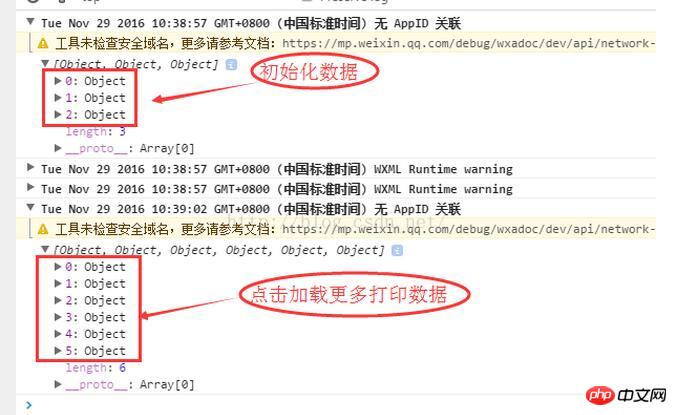
初始化和加载更多中的打印数据如下
(以上是点击查看更多,还可以根据距离视图区域的距离来加载更多,具体实现是将视图用050e2adc6de973d5d8d682f9c1b9f656标签,并给其一个固定高度,在给定参数中设置距离像素触发事件。具体文档:https://mp.weixin.qq.com/debug/wxadoc/dev/component/scroll-view.html?t=20161122)
以上就是本文的全部内容,希望对大家的学习有所帮助,更多相关内容请关注PHP中文网!
相关推荐:
关于微信小程序分页加载的代码
微信小程序开发之实现选项卡的页面切换
关于微信小程序中顶部导航栏的实现
以上就是关于微信小程序加载更多和点击查看更多的代码的详细内容,更多请关注知企PROSAAS其它相关文章!
**Categories:** 后端开发
---