### [微信小程序的自定义模态弹窗的介绍](https://www.prosaas.cn/article/17340)
**Published:** 2018-06-26T08:45:56
**Author:** 5201314
**Excerpt:** 这篇文章主要为大家详细介绍了微信小程序实战之自定义模态弹窗,具有一定的参考价值,感兴趣的小伙伴们可以参考一下首…
这篇文章主要为大家详细介绍了微信小程序实战之自定义模态弹窗,具有一定的参考价值,感兴趣的小伙伴们可以参考一下
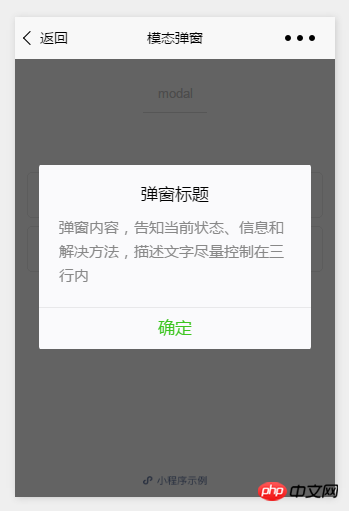
首先看看官方提供的模态弹窗,供大家参考,具体内容如下
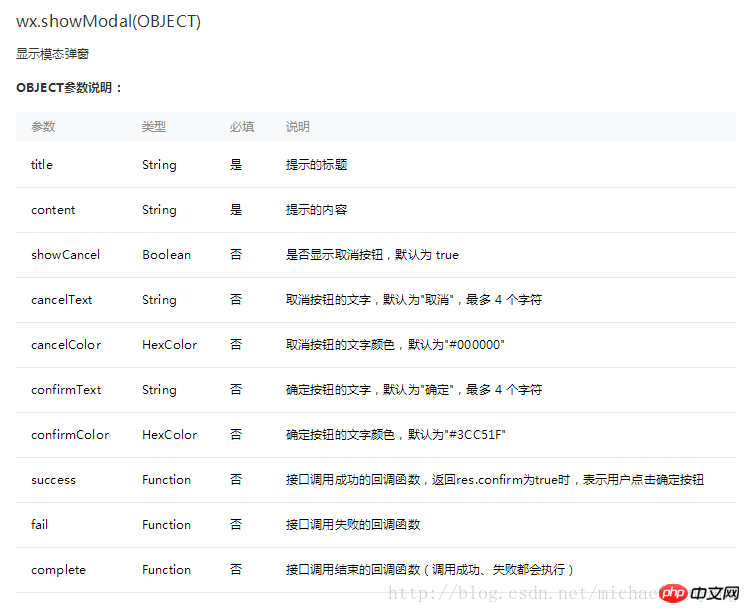
**api如下:**
**示例:**
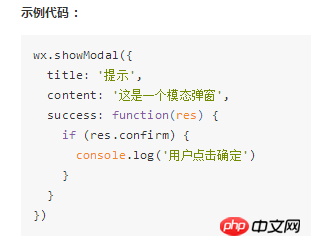
这样的模态弹窗,充其量只能做个alert,提示一下信息。
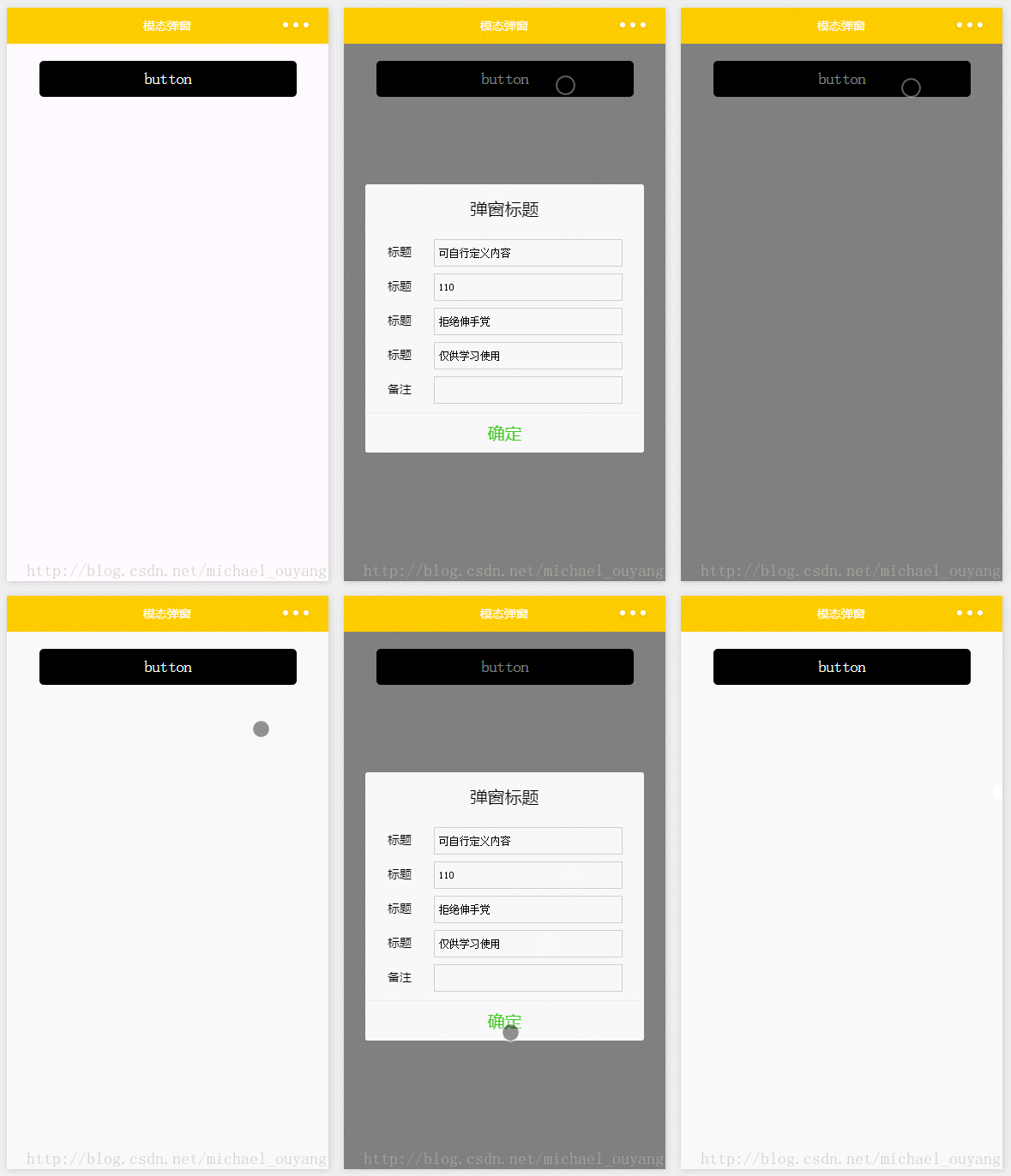
但是并不能使用它来处理复杂性的弹窗业务,因此写了Michael从新自定义了一个,采用了仿原生的样式写法
wxml:
button
弹窗标题
确定
wxss:
/\*button\*/
.btn {
width: 80%;
padding: 20rpx 0;
border-radius: 10rpx;
text-align: center;
margin: 40rpx 10%;
background: #000;
color: #fff;
}
/\*mask\*/
.drawer\_screen {
width: 100%;
height: 100%;
position: fixed;
top: 0;
left: 0;
z-index: 1000;
background: #000;
opacity: 0.5;
overflow: hidden;
}
/\*content\*/
.drawer\_box {
width: 650rpx;
overflow: hidden;
position: fixed;
top: 50%;
left: 0;
z-index: 1001;
background: #FAFAFA;
margin: -150px 50rpx 0 50rpx;
border-radius: 3px;
}
.drawer\_title{
padding:15px;
font: 20px "microsoft yahei";
text-align: center;
}
.drawer\_content {
height: 210px;
overflow-y: scroll; /\*超出父盒子高度可滚动\*/
}
.btn\_ok{
padding: 10px;
font: 20px "microsoft yahei";
text-align: center;
border-top: 1px solid #E8E8EA;
color: #3CC51F;
}
.top{
padding-top:8px;
}
.bottom {
padding-bottom:8px;
}
.title {
height: 30px;
line-height: 30px;
width: 160rpx;
text-align: center;
display: inline-block;
font: 300 28rpx/30px "microsoft yahei";
}
.input\_base {
border: 2rpx solid #ccc;
padding-left: 10rpx;
margin-right: 50rpx;
}
.input\_h30{
height: 30px;
line-height: 30px;
}
.input\_h60{
height: 60px;
}
.input\_view{
font: 12px "microsoft yahei";
background: #fff;
color:#000;
line-height: 30px;
}
input {
font: 12px "microsoft yahei";
background: #fff;
color:#000 ;
}
radio{
margin-right: 20px;
}
.grid { display: -webkit-box; display: box; }
.col-0 {-webkit-box-flex:0;box-flex:0;}
.col-1 {-webkit-box-flex:1;box-flex:1;}
.fl { float: left;}
.fr { float: right;}
js:
Page({
data: {
showModalStatus: false
},
powerDrawer: function (e) {
var currentStatu = e.currentTarget.dataset.statu;
this.util(currentStatu)
},
util: function(currentStatu){
/\* 动画部分 \*/
// 第1步:创建动画实例
var animation = wx.createAnimation({
duration: 200, //动画时长
timingFunction: "linear", //线性
delay: 0 //0则不延迟
});
// 第2步:这个动画实例赋给当前的动画实例
this.animation = animation;
// 第3步:执行第一组动画
animation.opacity(0).rotateX(-100).step();
// 第4步:导出动画对象赋给数据对象储存
this.setData({
animationData: animation.export()
})
// 第5步:设置定时器到指定时候后,执行第二组动画
setTimeout(function () {
// 执行第二组动画
animation.opacity(1).rotateX(0).step();
// 给数据对象储存的第一组动画,更替为执行完第二组动画的动画对象
this.setData({
animationData: animation
})
//关闭
if (currentStatu == "close") {
this.setData(
{
showModalStatus: false
}
);
}
}.bind(this), 200)
// 显示
if (currentStatu == "open") {
this.setData(
{
showModalStatus: true
}
);
}
}
})
运行:
以上就是本文的全部内容,希望对大家的学习有所帮助,更多相关内容请关注PHP中文网!
相关推荐:
微信小程序自定义toast实现的方法
微信小程序中video组件的介绍
以上就是微信小程序的自定义模态弹窗的介绍的详细内容,更多请关注知企PROSAAS其它相关文章!
**Categories:** 后端开发
---