### [微信小程序之电影影评小程序的制作](https://www.prosaas.cn/article/17368)
**Published:** 2018-06-23T09:02:23
**Author:** 5201314
**Excerpt:** 这篇文章主要为大家详细介绍了微信小程序之电影影评小程序制作代码,具有一定的参考价值,感兴趣的小伙伴们可以参考一…
这篇文章主要为大家详细介绍了微信小程序之电影影评小程序制作代码,具有一定的参考价值,感兴趣的小伙伴们可以参考一下
本文实例为大家分享了微信小程序制作影评小程序的具体代码,供大家参考,具体内容如下
这是博主的项目包含的文件截图:

首先如图建立文件夹和page页面
然后app.json页面更新代码如下:
{
"pages": \[
"pages/hotPage/hotPage",
"pages/comingSoon/comingSoon",
"pages/search/search",
"pages/more/more"
\],
"window": {
"backgroundTextStyle": "light",
"navigationBarBackgroundColor": "#fff",
"navigationBarTitleText": "WeChat",
"navigationBarTextStyle": "black"
},
"tabBar": {
"list": \[{
"pagePath": "pages/hotPage/hotPage",
"text": "本地热映"
},{
"pagePath": "pages/comingSoon/comingSoon",
"text": "即将上映"
},{
"pagePath": "pages/search/search",
"text": "影片搜索"
}\]
}
}
是app.wxss页面(为后面的页面样式写的):
/\*\*app.wxss\*\*/
.container {
height: 100%;
display: flex;
flex-direction: column;
align-items: center;
justify-content: space-between;
padding: 200rpx 0;
box-sizing: border-box;
}
/\* hotPage.wxss \*/
.movies{
display:flex;
}
.myimage{
flex: 1;
}
.moveInfo{
flex: 2;
}
.yanyuanlist{
display:flex;
}
.left{
flex:1;
}
.right{
flex:2;
}
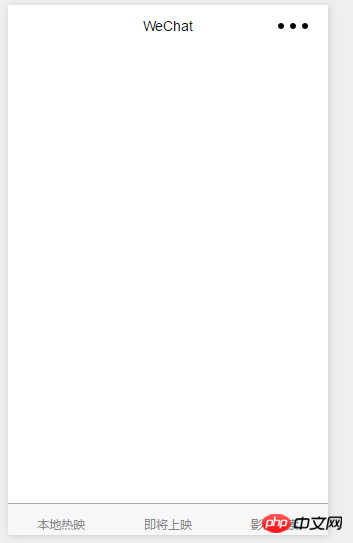
页面显示如图:
然后是hotPage.wxml页面:
名称:{{item.title}}
导演:{{item.directors\["0"\].name}}
演员:
{{item.name}}
分类:{{item.genres}}
上映时间:{{item.year}}
然后是hotPage.js页面:
var that;
var page = 0;
// more.js
Page({
/\*\*
\* 页面的初始数据
\*/
data: {
movies: \[\]
},
/\*\*
\* 生命周期函数--监听页面加载
\*/
onLoad: function (options) {
that = this;
that.linkNet(0);
},
jumpTomore: function (e) {
console.log(e.currentTarget.id);
wx.navigateTo({
url: '/pages/more/more?id=' + e.currentTarget.id,
})
},
linkNet: function (page) {
wx.request({
header: {
"Content-Type": "json"
},
url: 'https://api.douban.com/v2/movie/in\_theaters',
data: {
start: 10 \* page,
count: 10,
city: '成都'
},
success: function (e) {
console.log(e);
if (e.data.subjects.length == 0) {
wx.showToast({
title: '没有更多数据',
})
} else {
that.setData({
movies: that.data.movies.concat(e.data.subjects)
})
}
}
})
},
onReachBottom: function () {
that.linkNet(++page);
}
})
运行程序结果如图:

然后是hotPage.wxss:
image{
width:350rpx;
height:280rpx;
}
接着是第二个页面的布局和第一个页面一样,所以直接把第一个页面hotPage.wxml代码copy过来就好了;
同样comingSoon.js代码和hotPage.js代码也差不多,唯一需要改动的地方只有一个:
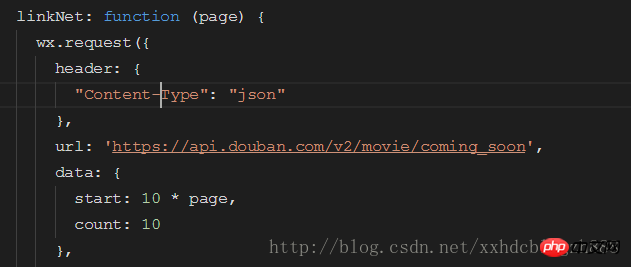
url和data改一下就好了
.wxss代码一致;
运行结果如下:

接着是第三个页面的代码:
search.wxml页面代码:
名称:{{item.title}}
导演:{{item.directors\["0"\].name}}
演员:
{{item.name}}
分类:{{item.genres}}
上映时间:{{item.year}}
页面代码:
var input;
var that;
// search.js
Page({
/\*\*
\* 页面的初始数据
\*/
data: {
movies: \[\]
},
/\*\*
\* 生命周期函数--监听页面加载
\*/
onLoad: function (options) {
that = this;
},
myInput: function (e) {
input = e.detail.value;
},
mySearch: function () {
wx.request({
header: {
"Content-Type": "json"
},
url: 'https://api.douban.com/v2/movie/search?q=' + input,
success: function (e) {
that.setData({
movies: e.data.subjects
})
}
})
}
})
.wxss代码同hotPage.wxss代码一致;
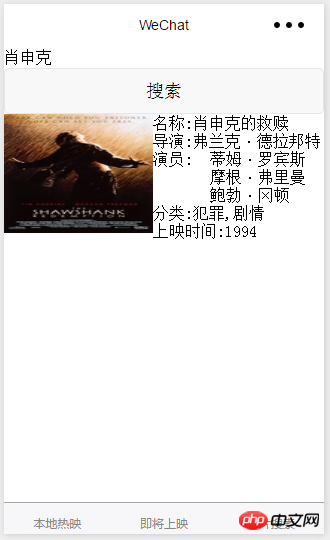
运行代码结果如下:
最后是详情页面,点击影片后会跳转到详情页面获得影片的详细信息:
more.wxml页面代码:
名字:{{title}}
导演:{{director}}
主演:
{{item.name}}
年份:{{year}}
评分:{{rate}}
介绍:{{summary}}
more.js代码:
var that;
// more.js
Page({
/\*\*
\* 页面的初始数据
\*/
data: {
title: 0,
imageUrl: 0,
director: 0,
casts: \[\],
year: 0,
rate: 0,
summary: 0
},
/\*\*
\* 生命周期函数--监听页面加载
\*/
onLoad: function (options) {
that = this;
wx.request({
header: {
"Content-Type": "json"
},
url: 'https://api.douban.com/v2/movie/subject/' + options.id,
success: function (e) {
console.log(e)
that.setData({
title: e.data.original\_title,
imageUrl: e.data.images.large,
director: e.data.directors\["0"\].name,
casts: e.data.casts,
year: e.data.year,
rate: e.data.rating.average,
summary: e.data.summary
})
}
})
}
})
运行代码结果如下:

好了、全部代码如上都给出了..加油
以上就是本文的全部内容,希望对大家的学习有所帮助,更多相关内容请关注PHP中文网!
相关推荐:
关于微信小程序的商城开发(ecshop )
微信小程序之小豆瓣图书的介绍
以上就是微信小程序之电影影评小程序的制作的详细内容,更多请关注知企PROSAAS其它相关文章!
**Categories:** 后端开发
---