### [微信小程序template模板的分析](https://www.prosaas.cn/article/17371)
**Published:** 2018-06-23T08:53:03
**Author:** 5201314
**Excerpt:** 这篇文章主要介绍了微信小程序template模板使用的相关资料,希望通过本文能帮助到大家,让大家理解掌握这样的…
这篇文章主要介绍了微信小程序template模板使用的相关资料,希望通过本文能帮助到大家,让大家理解掌握这样的功能,需要的朋友可以参考下
**微信小程序template模板使用**
**前言**
微信小程序中提供了template使用,即相同的板块可以进行代码互用,如下方的效果图,就可以用template。
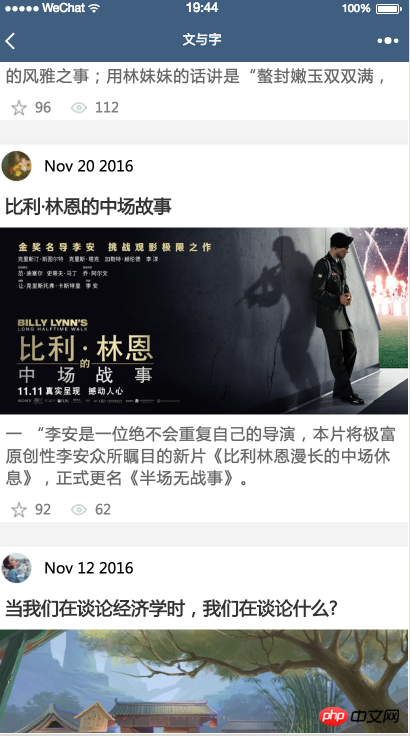
效果图
**一、模板定义**
模板最重要的是模板的名称,即""
以下是实例模板代码
{{date}}
{{title}}
{{content}}
{{collection}}
{{reading}}
wxss文件
.post-container {
display: flex;
flex-direction: column;
margin-top: 20rpx;
margin-bottom: 40rpx;
background-color: white;
border-bottom: 1px solid #ededed;
border-top: 1px solid #ededed;
padding-bottom: 5px;
}
.post-author-date {
margin: 10rpx 0 20rpx 10rpx;
}
.post-author {
width: 60rpx;
height: 60rpx;
vertical-align: middle;
}
.post-date {
margin-left: 20rpx;
vertical-align: middle;
margin-bottom: 5px;
font-size: 26rpx;
}
.post-title {
font-size: 34rpx;
font-weight: 600;
color: #333;
margin-bottom: 10px;
margin-left: 10px;
margin-right: 10px;
}
.post-image {
margin-left: 16px;
width: 100%;
height: 340rpx;
margin: auto 0;
margin-bottom: 15rpx;
}
.post-content {
color: #666;
font-size: 28rpx;
margin-bottom: 20rpx;
margin-left: 20rpx;
margin-right: 20rpx;
letter-spacing: 2rpx;
line-height: 40rpx;
}
.post-like {
font-size: 13px;
flex-direction: row;
line-height: 16px;
margin-left: 16px;
color: gray;
}
.post-like-image {
height: 16px;
width: 16px;
margin-right: 8px;
vertical-align: middle;
}
.post-link-text {
vertical-align: middle;
margin-right: 20px;
}
**二、模板使用**
引入模板文件
使用模板文件 用is 使用 模板定义时的名称 data里面是循环里面里面的数据 用“...”表示的话,就可以把item里面的数据全部平铺出来,这样在template里面就不用写“item.xx”了,直接写item里面的属性就可以了 要使用template的程序wxml文件
wxss 文件
@import 'post-item/post-item-template.wxss';
以上就是本文的全部内容,希望对大家的学习有所帮助,更多相关内容请关注PHP中文网!
相关推荐:
微信小程序图表插件(wx-charts)的介绍
微信小程序中picker组件的简单用法
微信小程序开发之实现自定义Toast弹框
以上就是微信小程序template模板的分析的详细内容,更多请关注知企PROSAAS其它相关文章!
**Tags:** php, 循环, 微信小程序
**Categories:** 后端开发
---