### [微信小程序中密码输入框的设计代码](https://www.prosaas.cn/article/17422)
**Published:** 2018-06-23T03:34:48
**Author:** 5201314
**Excerpt:** 这篇文章主要介绍了微信小程序 密码输入的相关资料,需要的朋友可以参考下设计支付密码的输入框效果如下:实例代码:…
这篇文章主要介绍了微信小程序 密码输入的相关资料,需要的朋友可以参考下
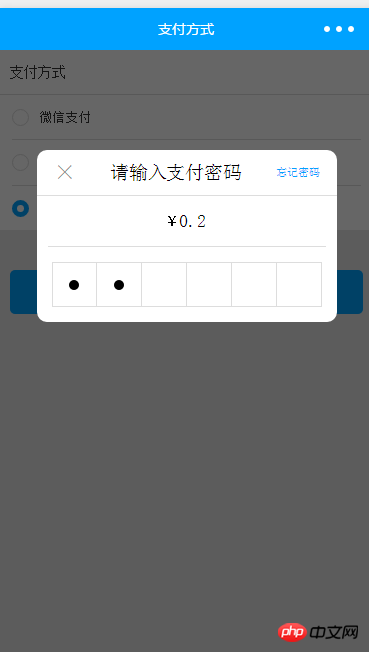
设计支付密码的输入框
效果如下:
**实例代码:**
支付方式
微信支付
对公打款
钱包支付(余额:{{balance/100}}元)
钱包支付(余额不足)
确定
×
请输入支付密码
忘记密码
¥
{{actual\_fee/100}}
**index.js**
Page({
data: {
payment\_mode: 1,//默认支付方式 微信支付
isFocus: false,//控制input 聚焦
balance:100,//余额
actual\_fee:20,//待支付
wallets\_password\_flag:false//密码输入遮罩
},
//事件处理函数
onLoad: function () {
},
wx\_pay() {//转换为微信支付
this.setData({
payment\_mode: 1
})
},
offline\_pay() {//转换为转账支付
this.setData({
payment\_mode: 0
})
},
wallet\_pay() {
this.setData({//转换为钱包支付
payment\_mode: 2
})
},
set\_wallets\_password(e) {//获取钱包密码
this.setData({
wallets\_password: e.detail.value
});
if (this.data.wallets\_password.length == 6) {//密码长度6位时,自动验证钱包支付结果
wallet\_pay(this)
}
},
set\_Focus() {//聚焦input
console.log('isFocus', this.data.isFocus)
this.setData({
isFocus: true
})
},
set\_notFocus() {//失去焦点
this.setData({
isFocus: false
})
},
close\_wallets\_password () {//关闭钱包输入密码遮罩
this.setData({
isFocus: false,//失去焦点
wallets\_password\_flag: false,
})
},
pay() {//去支付
pay(this)
}
})
/\*-----------------------------------------------\*/
/\*支付\*/
function pay(\_this) {
let apikey = \_this.data.apikey;
let id = \_this.data.id;
let payment\_mode = \_this.data.payment\_mode
if (payment\_mode == 1) {
// 微信支付
// 微信自带密码输入框
console.log('微信支付')
} else if (payment\_mode == 0) {
// 转账支付 后续跳转至传转账单照片
console.log('转账支付')
} else if (payment\_mode == 2) {
// 钱包支付 输入密码
console.log('钱包支付')
\_this.setData({
wallets\_password\_flag: true,
isFocus: true
})
}
}
// 钱包支付
function wallet\_pay(\_this) {
console.log('钱包支付请求函数')
/\*
1.支付成功
2.支付失败:提示;清空密码;自动聚焦isFocus:true,拉起键盘再次输入
\*/
}
**index.wxss**
page {
height: 100%;
width: 100%;
background: #e8e8e8;
}
page .pay {
display: flex;
flex-direction: column;
background: #fff;
}
page .pay .title {
height: 90rpx;
line-height: 90rpx;
font-size: 28rpx;
color: #353535;
padding: 0 23rpx;
border-bottom: 1rpx solid #ddd;
box-sizing: border-box;
}
page .pay .wx\_pay, page .pay .offline\_pay, page .pay .wallet\_pay {
margin: 0 26rpx;
height: 90rpx;
line-height: 90rpx;
border-bottom: 2rpx solid #ddd;
box-sizing: border-box;
display: flex;
align-items: center;
justify-content: flex-start;
}
page .pay .wx\_pay .icon, page .pay .offline\_pay .icon,
page .pay .wallet\_pay .icon {
width: 34rpx;
height: 34rpx;
border: 2rpx solid #ddd;
box-sizing: border-box;
border-radius: 50%;
}
page .pay .wx\_pay .icon.active, page .pay .offline\_pay .icon.active,
page .pay .wallet\_pay .icon.active {
border: 10rpx solid #00a2ff;
}
page .pay .wx\_pay text, page .pay .offline\_pay text, page .pay .wallet\_pay text {
margin-left: 20rpx;
color: #353535;
font-size: 26rpx;
}
page .pay .wallet\_pay {
border: 0;
border-top: 2rpx solid #ddd;
}
page .pay .offline\_pay {
border: 0 none;
}
page .save {
margin: 80rpx 23rpx;
color: #fff;
background: #00a2ff;
height: 88rpx;
line-height: 88rpx;
text-align: center;
font-size: 30rpx;
border-radius: 10rpx;
}
page .wallets-password {
position: absolute;
left: 0;
top: 0;
width: 100%;
height: 100%;
background: rgba(0, 0, 0, 0.6);
}
page .wallets-password .input-content-wrap {
position: absolute;
top: 200rpx;
left: 50%;
display: flex;
flex-direction: column;
width: 600rpx;
margin-left: -300rpx;
background: #fff;
border-radius: 20rpx;
}
page .wallets-password .input-content-wrap .top {
display: flex;
align-items: center;
height: 90rpx;
border-bottom: 2rpx solid #ddd;
justify-content: space-around;
}
page .wallets-password .input-content-wrap .top .close {
font-size: 44rpx;
color: #999;
font-weight: 100;
}
page .wallets-password .input-content-wrap .top .forget {
color: #00a2ff;
font-size: 22rpx;
}
page .wallets-password .input-content-wrap .actual\_fee {
display: flex;
align-items: center;
justify-content: center;
color: #000;
height: 100rpx;
margin: 0 23rpx;
border-bottom: 2rpx solid #ddd;
}
page .wallets-password .input-content-wrap .actual\_fee span {
font-size: 24rpx;
}
page .wallets-password .input-content-wrap .actual\_fee text {
font-size: 36rpx;
}
page .wallets-password .input-content-wrap .input-password-wrap {
display: flex;
align-items: center;
justify-content: center;
height: 150rpx;
}
page .wallets-password .input-content-wrap .input-password-wrap .password\_dot {
display: flex;
align-items: center;
justify-content: center;
text-align: center;
color: #000;
box-sizing: border-box;
width: 90rpx;
height: 90rpx;
border: 2rpx solid #ddd;
border-left: none 0;
}
page .wallets-password .input-content-wrap .input-password-wrap .password\_dot:nth-child(1) {
border-left: 2rpx solid #ddd;
}
page .wallets-password .input-content-wrap .input-password-wrap .password\_dot i {
background: #000;
border-radius: 50%;
width: 20rpx;
height: 20rpx;
}
page .wallets-password .input-content {
position: absolute;
opacity: 0;
left: -100%;
top: 600rpx;
background: #f56;
z-index: -999;
}
page .wallets-password .input-content.active {
z-index: -99;
}
以上就是本文的全部内容,希望对大家的学习有所帮助,更多相关内容请关注PHP中文网!
相关推荐:
微信小程序开发之实现自定义Toast弹框
微信开发之js实现tabs选项卡效果
以上就是微信小程序中密码输入框的设计代码的详细内容,更多请关注知企PROSAAS其它相关文章!
**Categories:** 后端开发
---