### [微信小程序文件类API详解](https://www.prosaas.cn/article/17530)
**Published:** 2018-05-30T06:22:27
**Author:** 5201314
**Excerpt:** 本文主要和大家分享微信小程序文件类API详解,希望能帮助到大家。一.小知识1.wx.saveFile(OBJE…
本文主要和大家分享微信小程序文件类API详解,希望能帮助到大家。
一.小知识
1.wx.saveFile(OBJECT):保存文件到本地。

wx.chooseImage({
success: function(res) {
var tempFilePaths = res.tempFilePaths
wx.saveFile({
tempFilePath: tempFilePaths\[0\],
success: function(res) {
var savedFilePath = res.savedFilePath
}
})
}
})
2.wx.getSavedFileList(OBJECT):获取本地已保存的文件列表
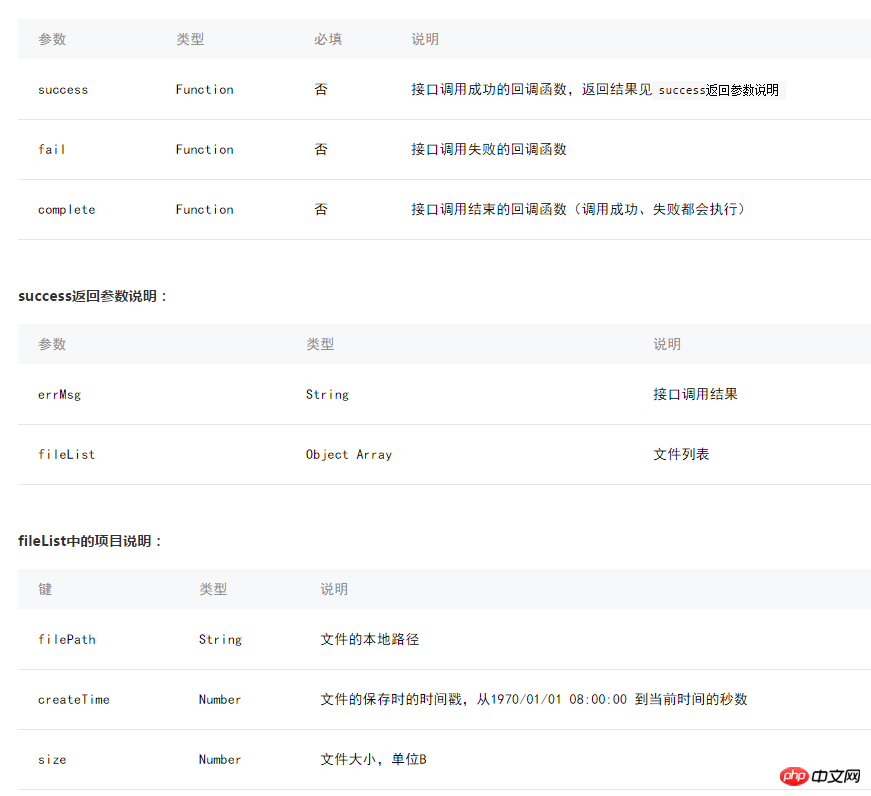
wx.getSavedFileList({
success: function(res) {
console.log(res.fileList)
}
})
3.wx.getSavedFileInfo(OBJECT):获取本地文件的文件信息
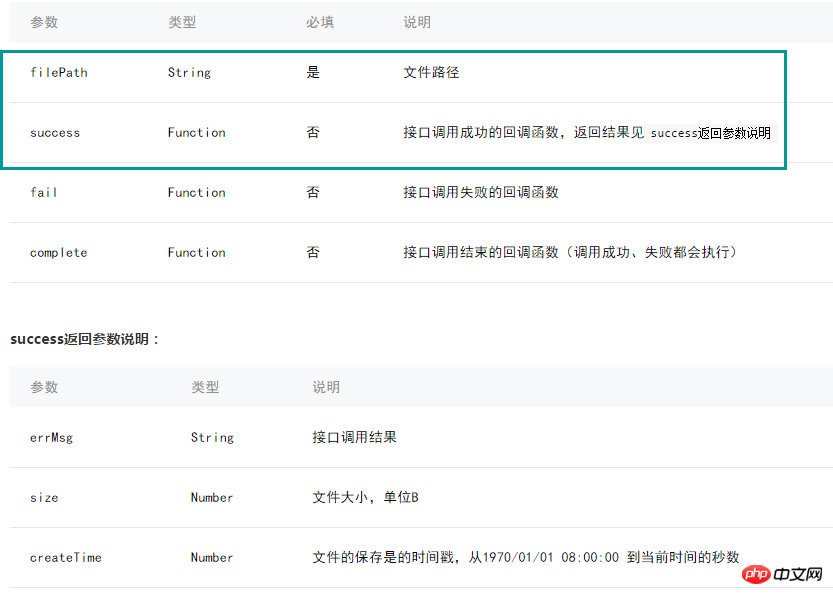
wx.getSavedFileInfo({
filePath: 'wxfile://somefile', //仅做示例用,非真正的文件路径
success: function(res) {
console.log(res.size)
console.log(res.createTime)
}
})
4.wx.removeSavedFile(OBJECT):删除本地存储的文件

wx.getSavedFileList({
success: function(res) {
if (res.fileList.length > 0){
wx.removeSavedFile({
filePath: res.fileList\[0\].filePath,
complete: function(res) {
console.log(res)
}
})
}
}
})
5.wx.openDocument(OBJECT):新开页面打开文档,支持格式:doc,
xls, ppt, pdf, docx, xlsx, pptx

wx.downloadFile({
url: 'http://example.com/somefile.pdf',
success: function (res) {
var filePath = res.tempFilePath
wx.openDocument({
filePath: filePath,
success: function (res) {
console.log('打开文档成功')
}
})
}
})
二.列子
3.wx.getSavedFileInfo(OBJECT):获取本地文件的文件信息
文件的路径:{{ path}}px
文件大小:{{filesize}}
//获取应用实例
var app = getApp()
Page({
data:{
path:'',
filesize:0,
},
upload:function(){
var that=this
wx.chooseImage({
count: 1,
sizeType: \['original', 'compressed'\],// 可以指定是原图还是压缩图,默认二者都有
sourceType: \['album', 'camera'\], // 可以指定来源是相册还是相机,默认二者都有
success: function (res) {
var tempFilePaths = res.tempFilePaths;
console.log(tempFilePaths)
wx.getSavedFileInfo({
filePath:res.tempFilePaths\[0\], //仅做示例用,非真正的文件路径
success: function(res) {
that.setData({
filesize:res.size,
})
}
})
that.setData({
path:tempFilePaths
})
}
})
}
})

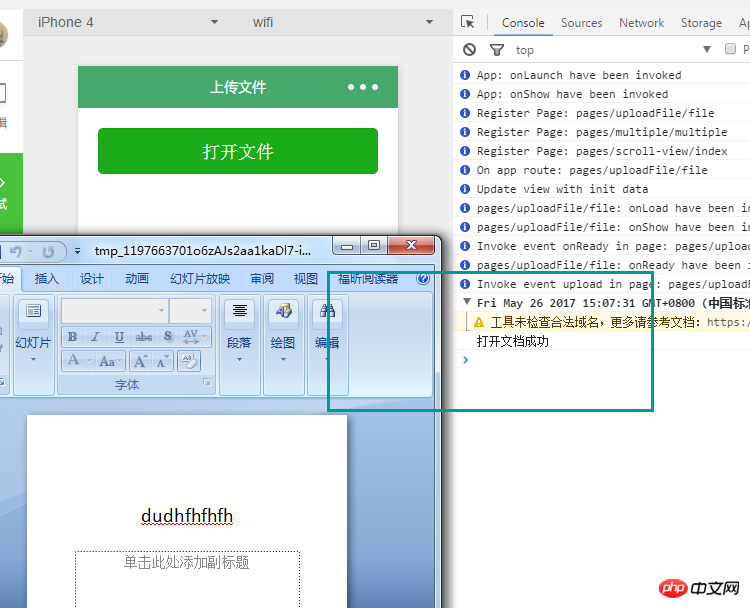
5.wx.openDocument(OBJECT):打开文档
//获取应用实例
var app = getApp()
Page({
data:{
path:'',
},
upload:function(){
var that=this
wx.downloadFile({
url: 'http://192.168.56.1/sino-ui/www.941in.com.hk/m.v1/o.pptx',//文件的在本地的路径
success: function (res) {
var filePath = res.tempFilePath
wx.openDocument({
filePath: filePath,
success: function (res) {
console.log('打开文档成功')
}
})
}
})
}
})
这个文件的路径,必须是http或是Https,不能使url: 'D:/WWW/sino-ui/www.941in.com.hk/m.v1/o.pptx',
相关推荐:
jQuery必须掌握的API
PHP如何开发api接口安全验证实例
PHP关于API接口实例分享
以上就是微信小程序文件类API详解的详细内容,更多请关注知企PROSAAS其它相关文章!
**Categories:** 后端开发
---