### [微信小程序之rich-text教程详解](https://www.prosaas.cn/article/17600)
**Published:** 2018-05-15T09:51:12
**Author:** 5201314
**Excerpt:** 这篇文章主要介绍了 微信小程序 rich-text的使用方法的相关资料,这里提供属性及方法并实现实例,帮助大家…
这篇文章主要介绍了 微信小程序 rich-text的使用方法的相关资料,这里提供属性及方法并实现实例,帮助大家学习理解,需要的朋友可以参考下
**微信小程序 rich-text的使用方法**
**rich-text**
- 属性:nodes 类型:Array / String 结点列表 / HTML String
- 全局支持class和style属性,不支持id属性。
- 结点类型:type = node , name 标签名 String 是 支持部分受信任的HTML结点, attrs 属性 Object 否 支持部分受信任的属性,遵循Pascal命名法 , children 子结点列表 Array 否 结构和nodes一致
- 结点类型:type = text ,text 文本 String 是 支持entities
- nodes 不推荐使用 String 类型,性能会有所下降
- rich-text 组件内屏蔽所有结点的事件。
- attrs 属性不支持 id ,支持 class 。
- name 属性大小写不敏感。
- 如果使用了不受信任的HTML结点,该结点及其所有子结点将会被移除。
- img 标签仅支持网络图片。
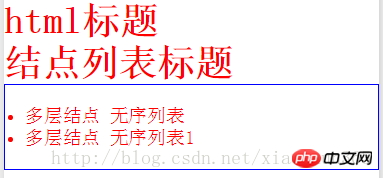
this.setData({
nodes: "html标题
",
nodes1: \[{
name: "h1",
attrs: {
style: "color:red",
class: "red"
},
children: \[{
type: "text",
text: '结点列表标题'
}\]
}\],
nodes2: \[{
name: "ul",
attrs: {
style: "padding:20px;border:1px solid blue;",
class: "red"
},
children: \[
{
name: "li",
attrs: {
style: "color:red",
class: "red"
},
children: \[{
type: "text",
text: '多层结点 无序列表'
}\],
}, {
name: "li",
attrs: {
style: "color:red",
class: "red"
},
children: \[{
type: "text",
text: '多层结点 无序列表1'
}\],
}\]
}\]
})
以上就是微信小程序之rich-text教程详解的详细内容,更多请关注知企PROSAAS其它相关文章!
**Categories:** 后端开发
---