### [微信小程序 自定义对话框实例详解](https://www.prosaas.cn/article/17608)
**Published:** 2018-05-15T07:18:36
**Author:** 5201314
**Excerpt:** 微信小程序 自定义对话框实例详解效果图:index.wxml: index.js: 感谢阅读,希望能帮助到大家…
**微信小程序 自定义对话框实例详解**
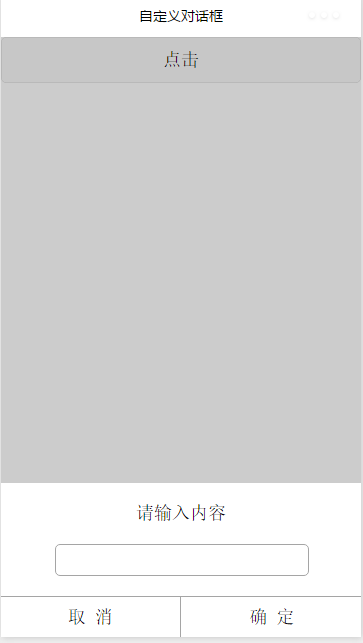
效果图:
index.wxml:
请输入内容
取 消
确 定
index.js:
var inputinfo = "";
var app = getApp()
Page({
data: {
animationData:"",
showModalStatus:false
},
onLoad: function () {
},
showModal: function () {
// 显示遮罩层
var animation = wx.createAnimation({
duration: 200,
timingFunction: "linear",
delay: 0
})
this.animation = animation
animation.translateY(300).step()
this.setData({
animationData: animation.export(),
showModalStatus: true
})
setTimeout(function () {
animation.translateY(0).step()
this.setData({
animationData: animation.export()
})
}.bind(this), 200)
},
clickbtn:function(){
if(this.data.showModalStatus){
this.hideModal();
}else{
this.showModal();
}
},
hideModal: function () {
// 隐藏遮罩层
var animation = wx.createAnimation({
duration: 200,
timingFunction: "linear",
delay: 0
})
this.animation = animation
animation.translateY(300).step()
this.setData({
animationData: animation.export(),
})
setTimeout(function () {
animation.translateY(0).step()
this.setData({
animationData: animation.export(),
showModalStatus: false
})
}.bind(this), 200)
},
click\_cancel:function(){
console.log("点击取消");
this.hideModal();
},
click\_ok:function(){
console.log("点击了确定===,输入的信息为为==",inputinfo);
this.hideModal();
},
input\_content:function(e){
console.log(e);
inputinfo = e.detail.value;
}
})
感谢阅读,希望能帮助到大家,谢谢大家对本站的支持!
更多微信微信小程序 自定义对话框实例详解相关文章请关注PHP中文网!
**Categories:** 后端开发
---