### [微信小程序选项卡功能的开发](https://www.prosaas.cn/article/17613)
**Published:** 2018-05-15T06:16:09
**Author:** 5201314
**Excerpt:** 本文主要和大家分享微信小程序选项卡功能的开发,希望能帮助到大家在pages文件里面创建swipertab文件夹…
本文主要和大家分享微信小程序选项卡功能的开发,希望能帮助到大家
在pages文件里面创建swipertab文件夹
1.编写页面结构:swipertab.wxml
tab一
tab二
tab三
tab一
tab二
tab三
2.设置数据:swipertab.js
//获取应用实例
var app = getApp()
Page({
data: {
/\*\*
\* 页面配置
\*/
winWidth: 0,
winHeight: 0,
// tab切换
currentTab: 0,
},
onLoad: function() {
var that = this;
/\*\*
\* 获取系统信息
\*/
wx.getSystemInfo({
success: function(res) {
that.setData({
winWidth: res.windowWidth,
winHeight: res.windowHeight
});
}
});
},
/\*\*
\* 滑动切换tab
\*/
bindChange: function(e) {
var that = this;
that.setData({
currentTab: e.detail.current
});
},
/\*\*
\* 点击tab切换
\*/
swichNav: function(e) {
var that = this;
if (this.data.currentTab === e.target.dataset.current) {
return false;
} else {
that.setData({
currentTab: e.target.dataset.current
})
}
}
})
3.设置样式:swipertab.wxss
.swiper-tab{
width: 100%;
border-bottom: 2rpx solid #777777;
text-align: center;
line-height: 80rpx;}
.swiper-tab-list{ font-size: 30rpx;
display: inline-block;
width: 33.33%;
color: #777777;
}
.on{ color: #da7c0c;
border-bottom: 5rpx solid #da7c0c;}
.swiper-box{ display: block; height: 100%; width: 100%; overflow: hidden; }
.swiper-box view{
text-align: center;
}
4.头部标题修改:swipertab.json
{
"navigationBarTitleText": "选项卡页面切换"
}
5.效果图
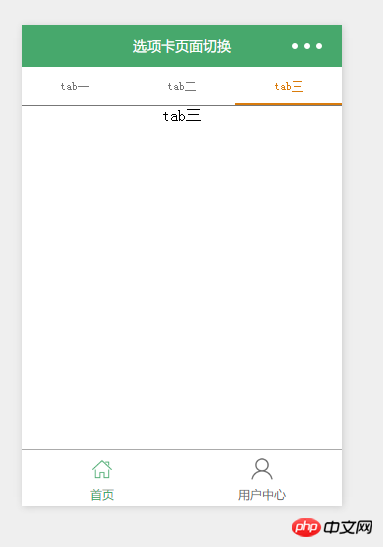
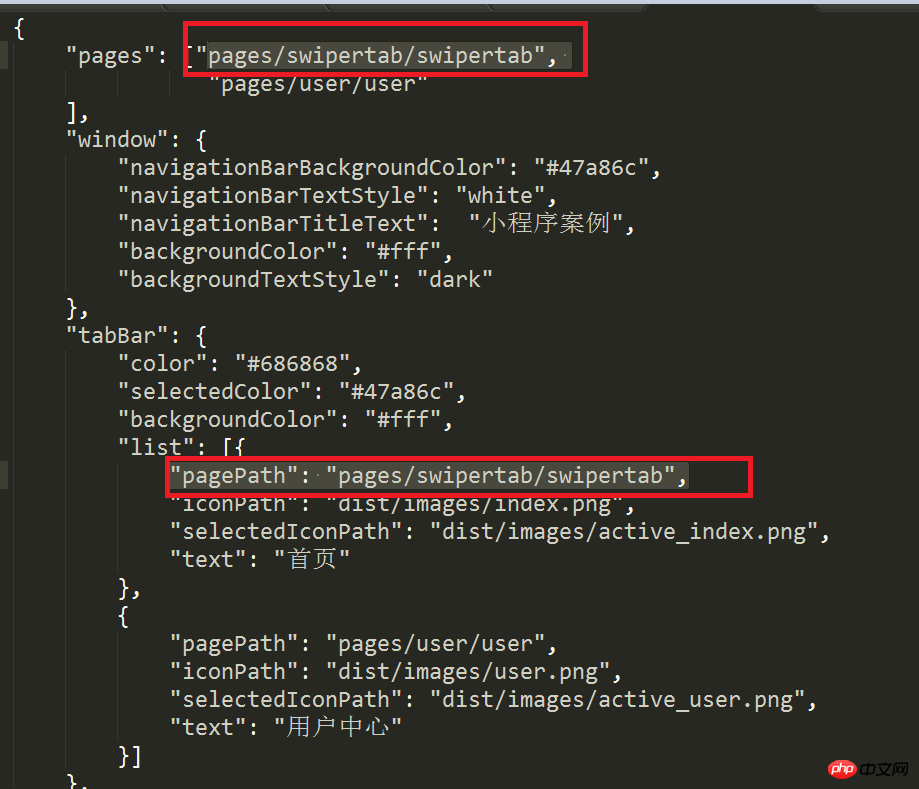
注意:因为文件名不是index,所以记得修改app.json文件(底下备注的地方),否则页面不会显示同时底部不会显示
相关推荐:
原生JS实现Tab选项卡各种效果
两种jQuery实现选项卡功能的方法
JavaScript插件Tab选项卡详解
以上就是微信小程序选项卡功能的开发的详细内容,更多请关注知企PROSAAS其它相关文章!
**Categories:** 后端开发
---