### [微信小程序模拟下拉菜单开发实例](https://www.prosaas.cn/article/17716)
**Published:** 2018-03-17T04:16:18
**Author:** 5201314
**Excerpt:** 本文主要和大家分享微信小程序模拟下拉菜单开发实例,希望能帮助到大家。一.知识点1.实现动态显示和隐藏某个控件6…
本文主要和大家分享微信小程序模拟下拉菜单开发实例,希望能帮助到大家。
一.知识点
1.实现动态显示和隐藏某个控件
606973d9ff634def542dbb90c18de189列表1de5f4c1163741e920c998275338d29b2
data:{
open:false
},
showitem:function(){
this.setData({
open:!this.data.open
})
},
.display\_show{
display: block;
}
.display\_none{
display: none;
}
2.通过 `data-*` 和 `e.target.dateset` 传递参数
{{firstPerson}}
吃
this.setData({
firstPerson:e.target.dataset.me,
})
这时:firstPerson=吃
3.弹性盒字:display:flex;
{{firstPerson}}
在父级:
display:flex;
justify-content:space-between;
这样子集就会并列。justify-content:space-between;这样子集就会分别在在俩头
二.事列
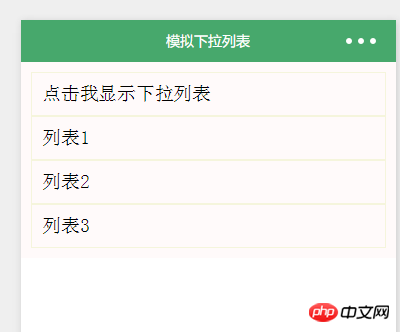
(1).下拉列表
1.wxml
点击我显示下拉列表
列表1
列表2
列表3
2.wxss
.page\_bd{
padding: 10px;
background-color: snow;
}
.body\_head{
border: 1px solid;
border-color: beige;
padding: 10px;
}
.display\_show{
display: block;
border: 1px solid;
border-color: beige;
padding: 10px;
}
.display\_none{
display: none;
}
3.js
Page({
data:{
open:false
},
showitem:function(){
this.setData({
open:!this.data.open
})
},
onLoad:function(options){
// 页面初始化 options为页面跳转所带来的参数
},
onReady:function(){
// 页面渲染完成
},
onShow:function(){
// 页面显示
},
onHide:function(){
// 页面隐藏
},
onUnload:function(){
// 页面关闭
}
})
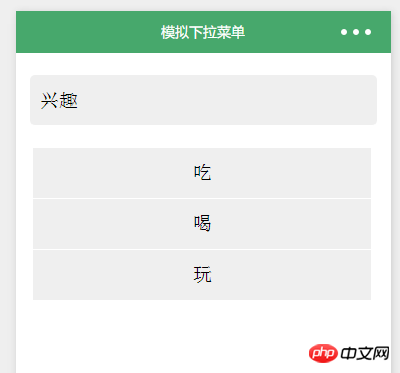
(2).下拉菜单
1.wxml
{{firstPerson}}
吃
喝
玩
2.wxss
phone\_personal{
width: 100%;
color:rgb(34, 154, 181);
height:100rpx;
line-height:100rpx;
text-align: center;
}
.phone\_one{
display:flex;
position:relative;
justify-content:space-between;
background-color:rgb(239, 239, 239);
width:90%;
height:100rpx;
margin:22px auto;
border-radius:10rpx;
border-bottom:2rpx solid rgb(255, 255, 255);
line-height:51px;
padding-left:10px;
}
.person\_box{
position: relative;
}
.phone\_select{
margin-top:0;
z-index: 100;
position: absolute;
}
.select\_one{
text-align: center;
background-color:rgb(239, 239, 239);
width:676rpx;
height:100rpx;
line-height:100rpx;
margin:0 5%;
border-bottom:2rpx solid rgb(255, 255, 255);
}
.personal\_image{
z-index: 100;
position: absolute;
right:2.5%;
width: 34rpx;
height: 20rpx;
margin:40rpx 20rpx 40rpx 0;
transition: All 0.4s ease;
-webkit-transition: All 0.4s ease;
}
.rotateRight{
transform: rotate(180deg);
}
3.js
Page({
data:{
selectPerson:true,
firstPerson:'兴趣',
selectArea:false,
},
//点击选择类型
clickPerson:function(){
var selectPerson = this.data.selectPerson;
if(selectPerson == true){
this.setData({
selectArea:true,
selectPerson:false,
})
}else{
this.setData({
selectArea:false,
selectPerson:true,
})
}
} ,
//点击切换
mySelect:function(e){
this.setData({
firstPerson:e.target.dataset.me,
selectPerson:true,
selectArea:false,
})
},
onLoad:function(options){
// 页面初始化 options为页面跳转所带来的参数
},
onReady:function(){
// 页面渲染完成
},
onShow:function(){
// 页面显示
},
onHide:function(){
// 页面隐藏
},
onUnload:function(){
// 页面关闭
}
})
相关推荐:
JavaScript模拟下拉菜单代码\_表单特效
以上就是微信小程序模拟下拉菜单开发实例的详细内容,更多请关注知企PROSAAS其它相关文章!
**Categories:** 后端开发
---